
JavaScript timers that easily toy with people’s feelings. JavaScript’s setTimeout and setInterval are two methods that very easily fool people’s feelings, because at first we often assume that once they are called they will execute in the established way. I think many people feel the same. For example1
2
3
4setTimeout(function() {
alert('你好!');
}, 0);
setInterval(callbackFunction, 100);
We believe the greeting method in setTimeout will be executed immediately, and this is not said out of thin air — the JavaScript API documentation clearly defines the second parameter’s meaning as how many milliseconds later the callback method will be executed. Here it’s set to 0 milliseconds, so naturally it is executed immediately. Likewise, we have no doubt at all that the callbackFunction method of setInterval is executed immediately every 100 milliseconds! But as your JavaScript application development experience keeps growing and enriching, one day you find a strange piece of code and cannot make any sense of it:1
2
3
4
5div.onclick = function(){
setTimeout(function() {
document.getElementById('inputField').focus();
}, 0);
};
Since it executes after 0 milliseconds anyway, what’s the point of still using setTimeout? At this moment, your firm belief begins to waver. Until finally, one day, you accidentally write a bad piece of code:1
2
3
4
5
6
7
8setTimeout(function() {
while (true) {
}
}, 100);
setTimeout(function() {
alert('你好!');
}, 200);
setInterval(callbackFunction, 200);
The first line of code enters an infinite loop, but before long you will discover that the second and third lines do not do what you expected: the alert greeting never appears, and callbacKFunction is nowhere to be heard either! Now you are completely bewildered. This situation is hard to accept, because the process of changing a long-held established understanding to accept a new idea is painful — but the facts are right in front of you, and the pursuit of JavaScript truth does not stop because of pain. Let’s now begin our journey of exploring JavaScript threads and timers! The clouds part and the moon appears. The most important reason all the misconceptions above arise is this: subconsciously we believe the JavaScript engine has multiple threads executing, and that JavaScript timer callback functions execute asynchronously. But in fact JavaScript uses a sleight of hand and fools our eyes most of the time. Here we have to clarify one fact: the JavaScript engine runs on a single thread, and the browser has only one thread running JavaScript programs at any time. It also makes sense for the JavaScript engine to run single-threaded — a single thread doesn’t have to worry about complicated issues like thread synchronization, so the problem is simplified. So how does the single-threaded JavaScript engine cooperate with the browser kernel to handle these timers and respond to browser events? Here is a brief explanation based on how the browser kernel handles things. A browser kernel implementation allows multiple threads to execute asynchronously, and these threads cooperate with each other under the kernel’s control to stay synchronized. Suppose a browser kernel implementation has at least three resident threads: the JavaScript engine thread, the interface rendering thread, and the browser event trigger thread. Besides these, there are also threads that terminate once they finish executing, such as the HTTP request thread. These asynchronous threads all produce different asynchronous events. Below, a diagram illustrates how the single-threaded JavaScript engine interacts and communicates with those other threads. Although every browser kernel implementation differs in the details, the calling principle behind them is much the same. 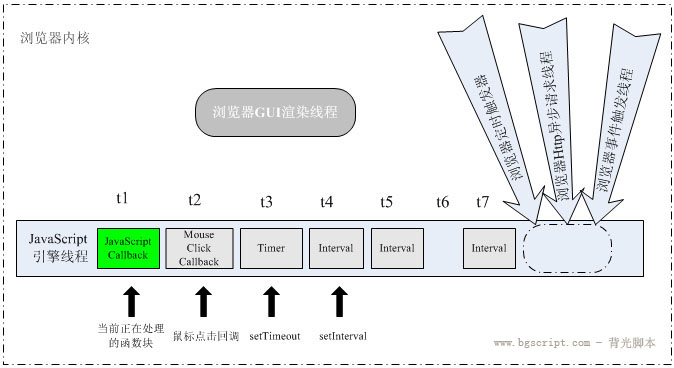 As the diagram shows, the JavaScript engine in the browser is event-driven. The events here can be seen as the various tasks the browser dispatches to it; these tasks can originate from the code block the JavaScript engine is currently executing, such as calling setTimeout to add a task, or they can come from other threads of the browser kernel, such as a mouse click event on an interface element, a notification that a timer’s time has arrived, or a notification of an asynchronous request state change. From the code’s point of view, the task entity is the various callback functions, and the JavaScript engine is always waiting for tasks to arrive in the task queue. Because of the single-threaded nature, these tasks have to be queued and handled by the engine one after another. In the diagram above, t1-t2..tn represent different points in time, and the small square below each tn represents the task at that point in time. Suppose it is now time t1 and the engine is running inside the task square corresponding to t1; within this point in time, let’s describe the state of the browser kernel’s other threads. At time t1: GUI rendering thread: this thread is responsible for rendering the browser interface’s HTML elements. When the interface needs a repaint or a reflow triggered by some operation, this thread executes. Although this article focuses on explaining the JavaScript timing mechanism, it is necessary here to talk about the rendering thread, because this thread and the JavaScript engine thread are mutually exclusive. That’s easy to understand, because JavaScript scripts can manipulate DOM elements, and if the interface were rendered at the same time as these elements’ attributes are modified, the element data the rendering thread obtained before and after could be inconsistent. While the JavaScript engine is running a script, the browser’s rendering thread is in a suspended state — that is, it is “frozen”. Therefore, update operations on the interface performed in a script, such as adding a node, deleting a node or changing a node’s appearance, are not reflected immediately; these operations are saved in a queue and only get a chance to be rendered when the JavaScript engine is idle. GUI event trigger thread: the execution of JavaScript scripts does not affect the triggering of html element events. During the t1 time period, first the user clicks a mouse button; after the browser event trigger thread captures the click, a mouse click event is formed. As the diagram shows, for the JavaScript engine thread this event is passed asynchronously by another thread to the tail of the task queue. Since the engine is handling the task at t1, this mouse click event is waiting to be handled. Timer trigger thread: note that in this browser model the timer counter is not counted by the JavaScript engine, because the JavaScript engine is single-threaded and cannot count time if it is in a blocked thread state; it must rely on the outside to time and trigger the timer, so the timer events in the queue are also asynchronous events. As the diagram shows, during this t1 time period, after the mouse click event is triggered, the previously set setTimeout timer also comes due. At this moment, for the JavaScript engine, the timer trigger thread has produced an asynchronous timer event and placed it in the task queue; this event is queued after the click event callback and waits to be handled. Likewise, still within the t1 time period, a certain setInterval timer is added next. Because it is an interval timer, it is triggered twice in a row within the t1 period, and these two events are queued at the tail to wait for handling. It can be seen that if the time period t1 is very long, far longer than setInterval’s timing interval, then the timer trigger thread will endlessly produce asynchronous timer events and put them at the tail of the task queue, regardless of whether they have already been handled. But once t1 and the tasks before the earliest timer event have been handled, these queued timer events are executed one after another without interruption, because for the JavaScript engine, all tasks in the queue are handled in the same way — only the order of handling differs. After t1 passes, that is, once the currently handled task has returned, the JavaScript engine checks the task queue, finds that the current queue is not empty, takes out the task corresponding to t2 and executes it, and so on for the other times. From this it seems: if the queue is not empty, the engine takes a task from the head of the queue, and only after that task has finished — that is, after it returns — does the engine go on to run the next task; before a task returns, the other tasks in the queue cannot be executed. I believe you are now very clear about whether JavaScript can be multi-threaded, and you also understand the JavaScript timer operating mechanism. Let’s now analyze some cases: Case 1: setTimeout and setInterval
1
2
3
4
5
6
7
8setTimeout(function() {
/\* code block... */
setTimeout(arguments.callee, 10);
}, 10);
setInterval(function(){
/*code block... */
}, 10);
These two pieces of code look like they have the same effect, but in fact they don’t. In the first piece, the setTimeout inside the callback function is set as a new setTimeout after the JavaScript engine executes, so assuming the interval from when the previous callback finishes to when the next callback starts being handled is one time interval, in theory the interval between two setTimeout callbacks being executed is >= 10ms. In the second piece, after setInterval sets the timer, the timer trigger thread will endlessly produce an asynchronous timer event every ten seconds and put it at the tail of the task queue, so in theory the interval between two setInterval callbacks being executed is <= 10. Case 2: Is an ajax asynchronous request really asynchronous? Many classmates and friends can’t figure this out: since JavaScript is said to run single-threaded, is XMLHttpRequest really asynchronous after connecting? Actually the request really is asynchronous, but this request is made by the browser opening a new thread (see the diagram above). When the request’s state changes, if a callback was set previously, this asynchronous thread produces a state change event and places it in the JavaScript engine’s processing queue to wait for handling. When the task is handled, the JavaScript engine always runs the callback function on a single thread — more specifically, it still runs the function set on onreadystatechange on a single thread. Repost source: http://www.9demo.com/archives/341


