
What is Nginx?
Nginx is a lightweight / high-performance reverse proxy web server, used for the HTTP, HTTPS, SMTP, POP3 and IMAP protocols. It implements very efficient reverse proxying and load balancing. It can handle 20,000-30,000 concurrent connections, and official monitoring shows it can support 50,000 concurrent connections. Many website users in China use nginx today, for example: Sina, NetEase, Tencent and others.
What are Nginx’s advantages?
Cross-platform, simple configuration.
Non-blocking, high-concurrency connections: handles 20,000-30,000 concurrent connections, with official monitoring supporting 50,000 concurrent connections.
Memory consumption
is small: running ten Nginx instances takes up only 150M of memory.
Low cost, and open source.
High stability; the probability of downtime is very small.
Built-in health check: if one server goes down, a health check is performed, and subsequent requests will no longer be sent to the downed server. The requests are resubmitted to the other nodes.
What are Nginx’s application scenarios?
http server. Nginx is an http service that can provide http services independently. It can serve as a static web page server.
Virtual hosts. It can virtualize multiple websites on a single server, for example the virtual machines used by personal websites.
Reverse proxy and load balancing. When a website’s traffic reaches a certain level and a single server cannot satisfy user requests, multiple servers can be clustered and nginx used as a reverse proxy. The load can then be shared evenly among the servers, avoiding the situation where one server goes down from high load while another server sits idle.
Security management can also be configured in nginz; for example, you can use Nginx to build an API gateway that intercepts each interface service.
How does Nginx handle requests?
1 | server { # start of the first server block, representing an independent virtual host site |
First, when Nginx starts it parses the configuration file to obtain the ports and IP addresses it needs to listen on, then initializes this monitoring Socket inside Nginx’s Master process (creating the Socket, setting options such as addr and reuse, binding to the specified ip address and port, and then listening).
Then it forks (an existing process can call the fork function to create a new process; the new process created by fork is called a child process) out multiple child processes.
After that, the child processes compete to accept new connections. At this point the client can initiate a connection to nginx. Once the client has completed the three-way handshake with nginx and established a connection, one of the child processes will successfully accept it, obtaining the Socket of this established connection, and then creates nginx’s wrapper for the connection, namely the ngx_connection_t struct.
Next, it sets the read/write event handler functions and adds read/write events to exchange data with the client.
Finally, Nginx or the client actively closes the connection; and with that, a connection has come to the end of its life.
How does Nginx achieve high concurrency?
    If a server uses one process (or thread) to handle one request, then the number of processes is the concurrency level. Obviously, this means many processes will be sitting around waiting. Waiting for what? Mostly waiting for network transmission.

    Nginx's asynchronous, non-blocking way of working makes use of exactly this waiting time. While it needs to wait, the process is freed up and stands by. The result is that a small number of processes solve a large number of concurrency problems.

    How does Nginx make use of this? Simply put: with the same 4 processes, if it used the approach of one process handling one request, then when 4 requests come in at the same time, each process handles one of them until the session closes. During that time, if a 5th request comes in, it cannot be responded to in time, because all 4 processes are still busy. So there is usually a scheduling process: whenever a new request comes in, a new process is opened to handle it.
Think back — doesn’t BIO have this very problem?
Nginx doesn't work that way. Each incoming request is handled by a worker process. But not for the entire duration — how far does it go? It goes as far as a point where blocking may occur, for example forwarding the request to an upstream (backend) server and waiting for the request to return. The worker handling it won't wait there like an idiot; after sending the request it registers an event: "if the upstream returns, let me know and I'll carry on." So it goes off to rest. At that point, if more requests come in, it can handle them again very quickly in the same way. And once the upstream server returns, this event is triggered, and only then does the worker take over, and only then does the request continue on its way.
This is why we say Nginx is based on the event model.
Because the nature of a web server’s work means that most of each request’s life is spent in network transmission, the time slice actually spent on the server machine is small. This is the secret behind solving high concurrency with just a few processes. Namely:
A web server happens to be a network IO intensive application, not a compute-intensive one.
Asynchronous, non-blocking, using epoll, and a great many optimizations in the details. These are precisely the technical cornerstones of what makes Nginx what it is.
What is a forward proxy?
A server located between the client and the origin server. In order to obtain content from the origin server, the client sends a request to the proxy and specifies the target (the origin server), and the proxy then passes the request on to the origin server and returns the content it obtains to the client.
Only the client can use a forward proxy. To sum up a forward proxy in one sentence: the proxy side acts on behalf of the client. For example: the OpenVPN we use, and so on.
What is a reverse proxy?
A reverse proxy is a mode in which a proxy server accepts connection requests from the Internet, then sends the requests to servers on the internal network and returns the results obtained from those servers to the clients on the Internet that requested the connection. In this case the proxy server presents itself externally as a reverse proxy server.
To sum up a reverse proxy in one sentence: the proxy side acts on behalf of the server side.
What are the advantages of a reverse proxy server?
A reverse proxy server can hide the existence and characteristics of the origin server. It acts as a middle layer between the internet cloud and the web servers. This is very good for security, especially when you use web hosting services.
What does the Nginx directory structure look like?
1 | tree /usr/local/nginx |
What attribute modules does the Nginx configuration file nginx.conf have?
1 | worker_processes 1;# number of worker processes |
What is the difference between a cookie and a session?
In common:
Store user information. Storage form: key-value format, key-value pairs of variables and variable contents.
Differences:
cookie
Stored in the client browser
Each domain name corresponds to one cookie; you cannot cross domain names to access other cookies
Users can view or modify cookies
Set for your browser in the http response message
The key (used to open the lock in the browser)
session:
Stored on the server (files, databases, redis)
Stores sensitive information
The lock
Why doesn’t Nginx use multithreading?
Apache: creates multiple processes or threads, and each process or thread is allocated cpu and memory (threads are much smaller than processes, so workers support higher concurrency than prefork). Excessive concurrency will drain the server's resources.
Nginx: uses a single thread to handle requests asynchronously and non-blockingly (administrators can configure the number of worker processes of the Nginx master process) (epoll). It does not allocate cpu and memory resources for each request, saving a great deal of resources and also reducing a lot of CPU context switching. That is what enables Nginx to support higher concurrency.
The difference between nginx and apache
Lightweight: for the same web service, it uses less memory and fewer resources than apache.
Concurrency resistance: nginx handles requests asynchronously and non-blockingly, while apache is blocking, so under high concurrency nginx can maintain high performance with low resource usage and low consumption.
A highly modular design, making modules relatively simple to write.
The most fundamental difference is that apache is a synchronous multi-process model, where one connection corresponds to one process, while nginx is asynchronous, where multiple connections can correspond to one process.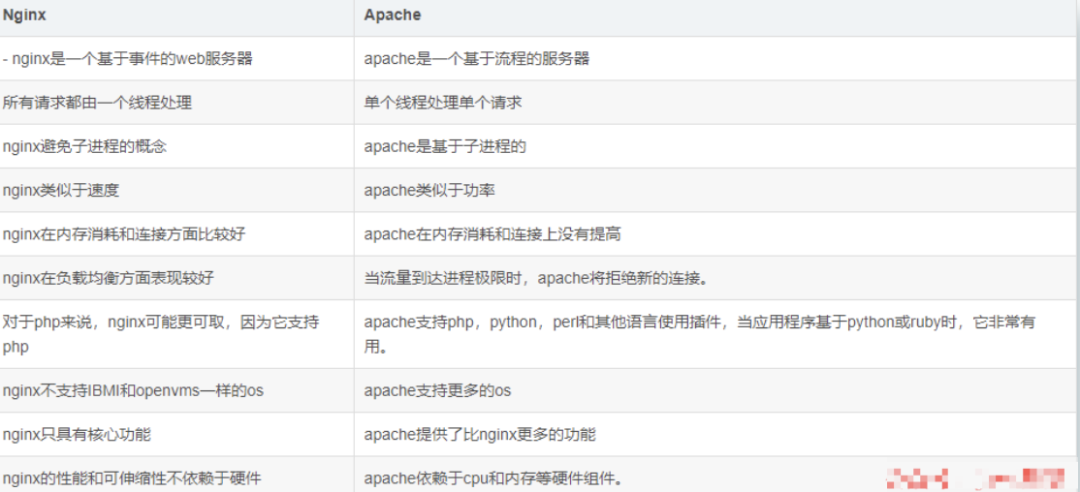
What is the separation of dynamic and static resources?
Separating dynamic and static resources means having the dynamic pages in a dynamic website distinguish, according to certain rules, between resources that don't change and resources that change frequently. Once the dynamic and static resources have been properly split, we can cache the static resources according to their characteristics — this is the core idea behind making a website static.
To put the separation of dynamic and static resources simply: it is the separation of dynamic files from static files.
Why separate dynamic and static content?
In our software development, some requests need to be handled by the backend (such as .jsp, .do and so on), and some requests do not need to go through backend handling (such as css, html, jpg, js and other files). Those files that do not need backend handling are called static files, otherwise they are dynamic files.
Therefore our backend handling ignores static files. Someone will say: then can't I just have the backend ignore static files? Of course that is possible, but that way the number of backend requests increases noticeably. When we have requirements on the response speed of resources, we should use this dynamic/static separation strategy to solve it. Dynamic/static separation deploys the website's static resources (HTML, JavaScript, CSS, img and other files) separately from the backend application, improving the speed at which users access static code and reducing access to the backend application.
Here we put static resources into Nginx and forward dynamic resources to the Tomcat server.
Of course, because CDN services such as Qiniu and Alibaba Cloud are now very mature, the mainstream approach is to cache static resources in a CDN service, thereby improving access speed.
Compared with a local Nginx, CDN servers have more nodes within the country, so users can access from a nearby location. What's more, CDN services can provide greater bandwidth, unlike our own application services, whose bandwidth is limited.
What is a CDN service?
CDN, that is, a content delivery network.
Its purpose is, by adding a new layer of network architecture on top of the existing Internet, to publish the website’s content to the network edge closest to users, so that users can obtain the content they need from a nearby location and the speed at which users access the website is improved.
Generally speaking, because CDN services are now quite commonplace, basically all companies use CDN services.
How does Nginx do dynamic/static separation?
You only need to specify the directory corresponding to the path. A location / can use regular expression matching, and you specify the corresponding directory on the hard disk. As follows: (the operations are all on Linux)
1 | location /image/ { |
Open a browser and enter server_name/image/1.jpg and you can access that static image.
How is Nginx’s load balancing algorithm implemented? What strategies are there?
To avoid server crashes, people share the server load through load balancing. Several servers are formed into a cluster, and when a user visits, they first reach a forwarding server, which then distributes the visit to the servers under less load.
Nginx implements load balancing with the following five strategies:
1 . Round robin (default)
Each request is assigned in chronological order, one by one, to a different backend server. If one of the backend servers goes down, the failed system is automatically removed.
1 | upstream backserver { |
- Weight
The larger the value of weight, the higher the probability of being assigned visits. It is mainly used when the performance of each backend server is uneven. Secondly, it is used to set different weights in a master-slave setup, so that host resources are used reasonably and effectively.
1 | # The higher the weight, the greater the probability of being visited; in the example above, 20% and 80% respectively. |
- ip_hash (IP binding)
Each request is assigned according to the hash result of the visiting IP, so that visitors from the same IP are pinned to one backend server. It also effectively solves the session sharing problem that exists with dynamic web pages.
1 | upstream backserver { |
- fair (third-party plugin)
The upstream_fair module must be installed.
A more intelligent load balancing algorithm than weight and ip_hash, the fair algorithm performs load balancing intelligently based on page size and loading time, giving priority to servers with a short response time.
1 | # Whichever server responds faster gets the request allocated to it. |
- url_hash (third-party plugin)
The Nginx hash package must be installed.
Requests are assigned according to the hash result of the visited url, so that each url is directed to the same backend server, which can further improve the efficiency of backend cache servers.
1 | upstream backserver { |
How do you use Nginx to solve the front-end cross-origin problem?
Use Nginx to forward requests. Write the cross-origin interfaces as calls to interfaces in your own domain, then forward those interfaces to the real request addresses.
How do you configure Nginx virtual hosts?
Domain-based virtual hosts, distinguishing virtual hosts by domain name — application: external websites
Port-based virtual hosts, distinguishing virtual hosts by port — application: internal company websites, admin backends of external websites
IP-based virtual hosts.
Configuring domain names based on virtual hosts
You need to create the /data/www and /data/bbs directories, add the domain name resolution corresponding to the virtual machine’s ip address to the local hosts file on windows, and add an index.html file under the directory of the corresponding domain website;
1 | # when the client visits www.lijie.com with listening port 80, it goes directly to the file under the data/www directory |
Port-based virtual hosts
Distinguished by port; the browser accesses using the domain name or ip address plus port number
1 | # when the client visits www.lijie.com with listening port 8080, it goes directly to the file under the data/www directory |
What is the purpose of location?
The purpose of the location directive is to execute different applications according to the URI requested by the user, that is, to match against the website URL requested by the user and perform the related operations once the match succeeds.
Can you state the syntax of location?
Note: ~ represents the English letters you type in yourself
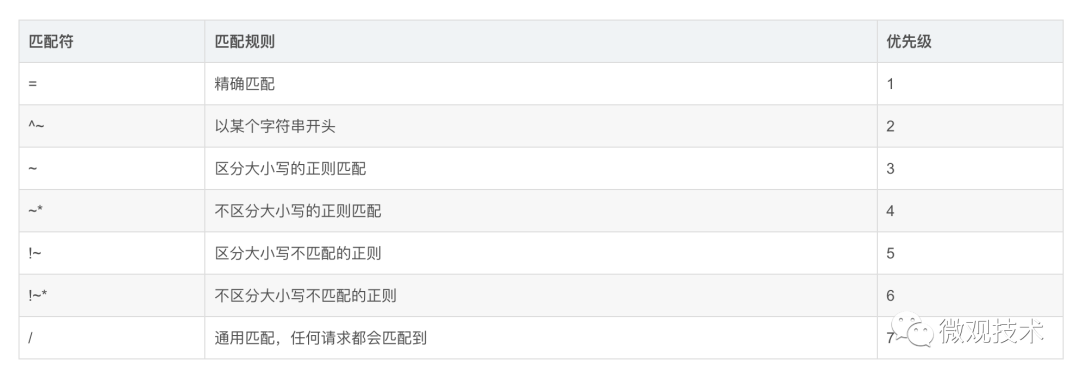
Location regex examples
1 | # priority 1, exact match, root path |
How is rate limiting done?
Nginx rate limiting means limiting the speed of user requests, to keep the server from being overwhelmed.
There are 3 kinds of rate limiting
Normal access frequency limiting (normal traffic)
Burst access frequency limiting (burst traffic)
Limiting the number of concurrent connections
Nginx’s rate limiting is all based on the leaky bucket algorithm
Implementing the three rate limiting algorithms
- Normal access frequency limiting (normal traffic):
Limit the requests one user sends: how often Nginx accepts one request.
Nginx uses the ngx_http_limit_req_module module to limit access frequency; the limiting principle is in essence implemented based on the leaky bucket algorithm. In the nginx.conf configuration file you can use the limit_req_zone directive and the limit_req directive to limit the request handling frequency of a single IP.
1 | # define the rate limiting dimension: one request per user per minute comes in, all the excess is leaked away |
1r/s means one request per second, 1r/m means accepting one request per minute. If Nginx still has someone else’s request unfinished at that moment, Nginx will refuse to handle that user’s request.
- Burst access frequency limiting (burst traffic):
Limit the requests one user sends: how often Nginx accepts one.
The configuration above can limit access frequency to a certain extent, but there is also a problem: if the burst traffic exceeds the limit and requests are refused handling, the burst traffic during an event cannot be handled. How should this be handled further, then?
Nginx provides the burst parameter together with the nodelay parameter to solve the traffic burst problem; you can set the number of extra requests that can be handled beyond the configured request count. We can add the burst parameter and the nodelay parameter to the previous example:
1 |
|
Why add just a burst=5 nodelay;? Adding this means that Nginx will immediately handle the first five requests from one user, and the rest trickle through slowly: if there are no other users' requests I'll handle yours, but if there are other requests then Nginx leaks yours away and does not accept your request.
- Limiting the number of concurrent connections
The ngx_http_limit_conn_module module in Nginx provides the ability to limit the number of concurrent connections; you can configure it using the limit_conn_zone directive and the limit_conn directive. Next let’s look at a simple example:
1 | http { |
The configuration above allows a single IP at most 10 concurrent connections, and sets the maximum number of concurrent connections of the entire virtual server to at most 100. Of course, the virtual server’s connection count is only counted after the request’s header has been processed by the server. We mentioned earlier that Nginx is implemented based on the leaky bucket algorithm; in fact rate limiting is generally implemented based on the leaky bucket algorithm and the token bucket algorithm.
Do you know the leaky bucket algorithm and the token bucket algorithm?
Leaky bucket algorithm
The idea behind the leaky bucket algorithm is very simple: we compare water to requests, and the leaky bucket to the system’s processing capacity limit. The water first enters the leaky bucket, and the water in the bucket flows out at a certain rate. When the outflow rate is less than the inflow rate, then because the leaky bucket’s capacity is limited, the water that enters afterwards directly overflows (requests are rejected), and rate limiting is achieved in this way.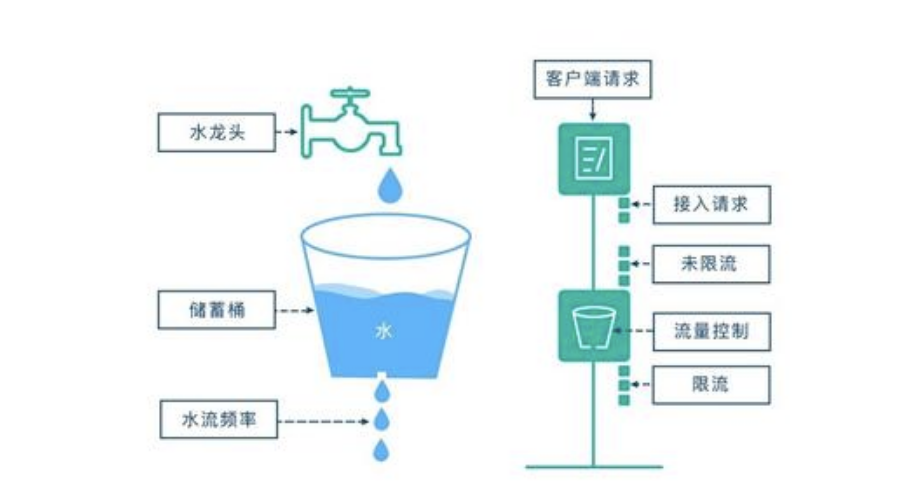
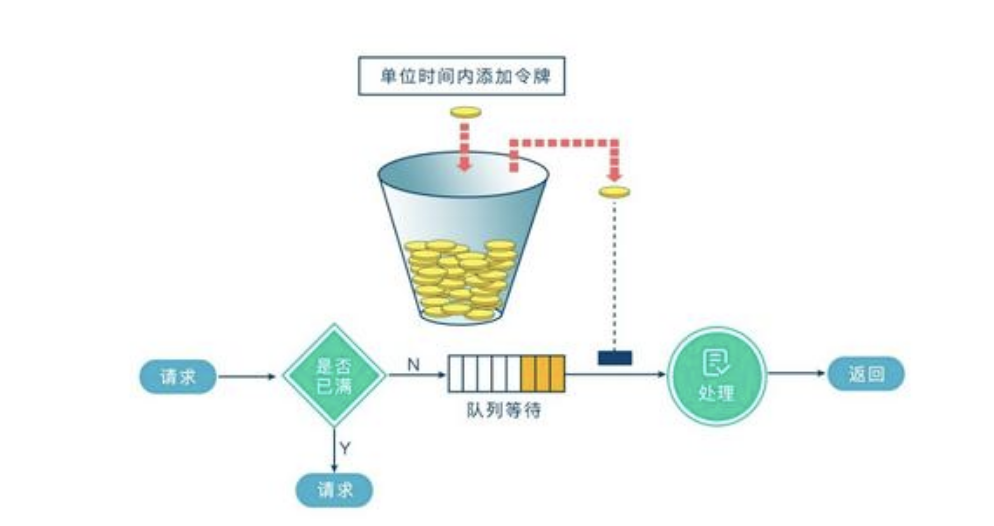
Token bucket algorithm
The principle of the token bucket algorithm is also fairly simple; we can understand it as registering at a hospital to see a doctor — only after you get a number can you be seen.
The system maintains a token bucket and puts tokens into the bucket at a constant rate. At this point, if a request comes in wanting to be handled, it needs to first obtain a token from the bucket; when there are no tokens left in the bucket to take, that request will be denied service. The token bucket algorithm achieves request limiting by controlling the bucket's capacity and the rate at which tokens are issued.
How do you configure Nginx for high availability?
When an upstream server (the real server being accessed) fails or does not respond in time, it should be rotated directly to the next server, ensuring high availability of the server.
Nginx configuration code:
1 | server { |
How does Nginx determine that a certain IP cannot access?
1 | # if the visiting ip address is 192.168.9.115, return 403 |
In nginx, how do you use an undefined server name to prevent requests from being handled?
You just need to define the server for which requests are dropped as follows:
The server name is kept as an empty string; it matches requests that have no host header field, and a special non-standard nginx code is returned, thereby terminating the connection.
How do you restrict browser access?
1 | ## do not allow access from Google Chrome; if it is Google Chrome return 500 |
How does Nginx implement health checks for backend services?
Approach one: use nginx’s built-in modules ngx_http_proxy_module and ngx_http_upstream_module to perform health checks on backend nodes.
Approach two (recommended): use the nginx_upstream_check_module module to perform health checks on backend nodes.
How does Nginx enable compression?
After enabling nginx gzip compression, the size of static resources such as web pages, css and js is greatly reduced, which saves a lot of bandwidth, improves transfer efficiency and gives users a fast experience. Although it consumes cpu resources, it is worth it in order to give users a better experience.
The configuration to enable it is as follows:
Put the above configuration into the http{…} node of nginx.conf.
1 | http { |
Save and restart nginx, then refresh the page (please force refresh to avoid caching) and you will see the effect. Taking Google Chrome as an example, look at the response headers of the request via F12:
We can first compare the size of the corresponding files before we enabled zip compression, as shown below:

Now the file size after we enabled gzip compression can be seen as follows:

And if we look at the response headers we will see gzip compression, as follows
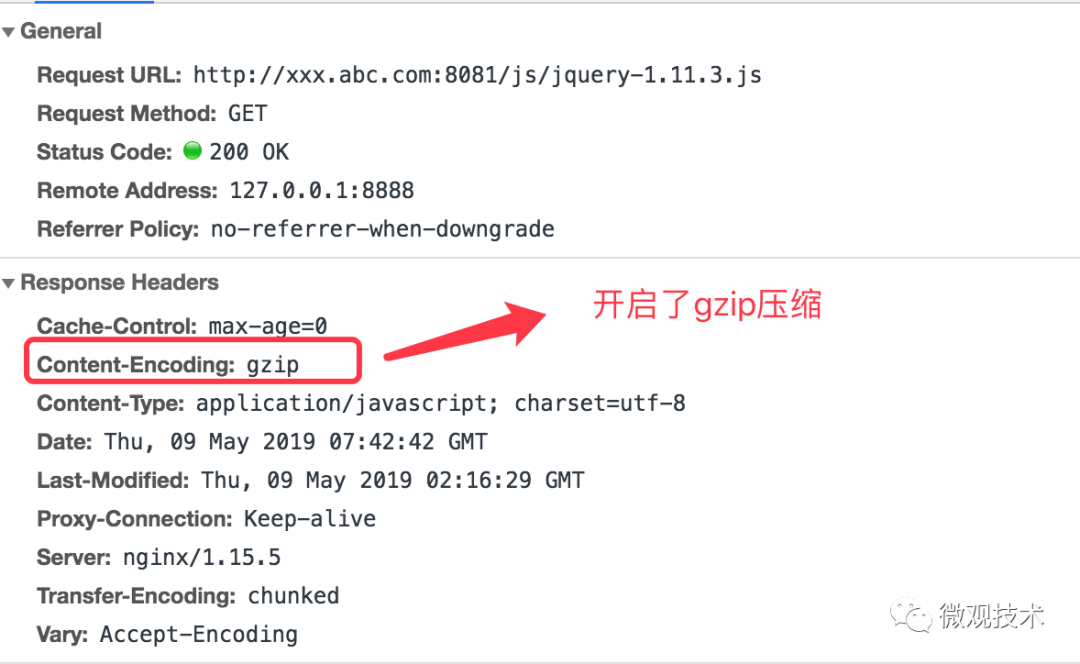
Comparison of the effect of gzip before and after: jquery was originally 90kb, and only 30kb after compression.
Although gzip is useful, it is not recommended to enable it for the following types of resources.
Image types
Reason: images such as jpg and png are already compressed themselves, so even after enabling gzip there is not much difference in size before and after compression; enabling it therefore just wastes resources for nothing. (Tips: you can try compressing a jpg image into a zip and observe that the size does not change much. Although the zip and gzip algorithms are different, you can see that compressing images is not worth much)Large files
Reason: it consumes a large amount of cpu resources, and the effect is not necessarily noticeable.
What is the purpose of ngx_http_upstream_module?
ngx_http_upstream_module is used to define groups of servers that can be referenced by the fastcgi pass, proxy pass, uwsgi pass, memcached pass and scgi pass directives.
What is the C10K problem?
The C10K problem refers to the inability to handle a large number of client (10,000) network sockets at the same time.
Does Nginx support compressing requests to the upstream?
You can use the Nginx module gunzip to compress requests to the upstream. The gunzip module is a filter that can decompress responses using "Content-Encoding: gzip" for clients or servers that do not support the "gzip" encoding method.
How do you get the current time in Nginx?
To get Nginx’s current time, you must use the SSI module, and the date_local variable.
1 | Proxy_set_header THE-TIME $date_gmt; |
What is the purpose of the -s parameter for the Nginx server?
It is the executable used to run the Nginx -s parameters.
How do you add modules on an Nginx server?
Nginx modules must be selected during compilation, because Nginx does not support selecting modules at runtime.
How do you set the number of worker processes in production?
When there are multiple cpus, you can set up multiple workers; the number of worker processes can be set to the same as the number of cpu cores. If you start multiple worker processes on a single cpu, the operating system will schedule between the multiple workers, and this situation will reduce system performance. If there is only one cpu, then starting just one worker process is enough.
nginx status codes
499:
The server took too long to process, and the client actively closed the connection.
502:
(1). Whether the FastCGI process has been started
(2). Whether there are not enough FastCGI worker processes
(3). FastCGI execution time is too long
- fastcgi_connect_timeout 300;
- fastcgi_send_timeout 300;
- fastcgi_read_timeout 300;
(4). The FastCGI Buffer is not enough. Like nginx and apache, there is a front-end buffer limit, and the buffer parameters can be adjusted
- fastcgi_buffer_size 32k;
- fastcgi_buffers 8 32k;
(5). The Proxy Buffer is not enough; if you use Proxying, adjust
- proxy_buffer_size 16k;
proxy_buffers 4 16k;
(6). The php script execution time is too longChange the 0s of 0s in php-fpm.conf to a real time
Original source: blog.csdn.net/wuzhiwei549/article/details/122758937


