Open People Input (OPI)
The Chinese name is 小欧 (Xiǎo’ōu — also the project pet’s name), and the English name is opi; the input method is officially 小欧输入法 (opi input method is also acceptable).
A multi-platform input method that returns to essentials, usable by everyone
(Build / package / install / use — split into volumes by platform.)
One step is mandatory after installation: add OPI to your input method group — a newly installed input method is not enabled automatically. Skip this step and
it will show up in the input method list, but typing will do nothing (the fcitx5 addon reload is already handled by the install script).Website: https://opi.erik.xyz — a scroll-through project introduction, a 3D keycap environment and a first-visit memory timeline, feature iterations, the full version log, and downloads for every platform (the tip QR code opens in place; the footer carries the registration number).
Verification scope: currently Android (emulator), Windows (real hardware, user acceptance) and Linux (container / local machine) have runtime verification; iOS / macOS / HarmonyOS already have client code or buildable artifacts, but none has been accepted on real hardware, and signing has not been verified either.
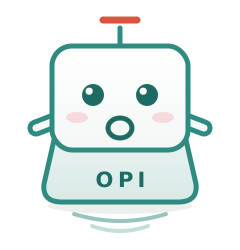
OPI project pet: keycap sprite “小欧”
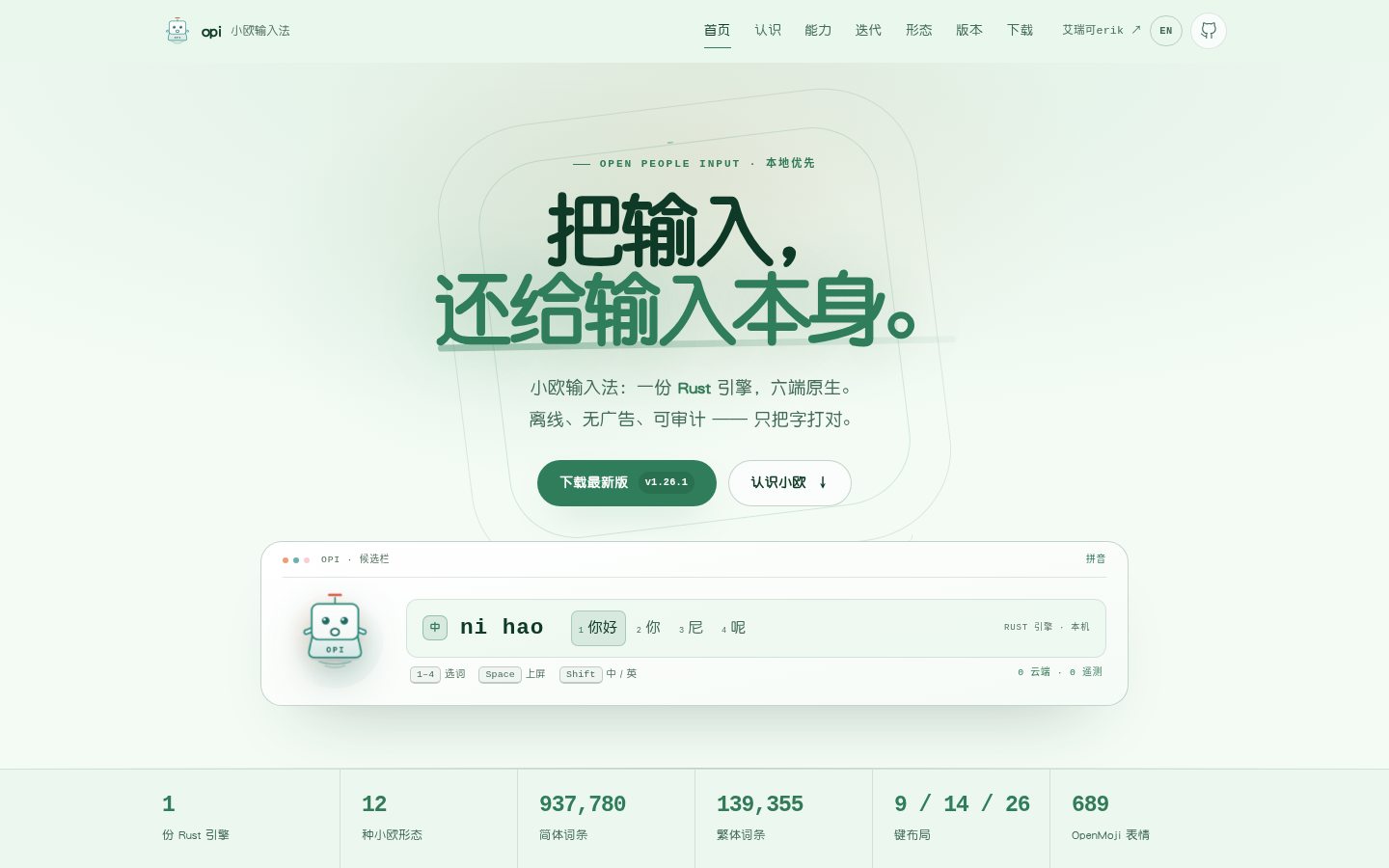
OPI website home: give input back to input itself
🐾 Meet 小欧
小欧 is OPI’s project pet — a keycap sprite.
It looks like a single key on a keyboard, because an input method should be exactly that and nothing else.
| On its body | Meaning |
|---|---|
| Body = keycap | The essence of input. It doesn’t steal the show; it does one small thing |
| Mouth = the letter O | Open — open source, open, auditable |
| Antenna on top = pinyin tone ˉ | Pinyin input. Cinnabar red — the only warm color on its entire body |
| Engraving on the side = OPI | The keycap’s legend position, and exactly the project name |
| Ripples underneath | The wake after a key press, spreading only on this machine — never outward |
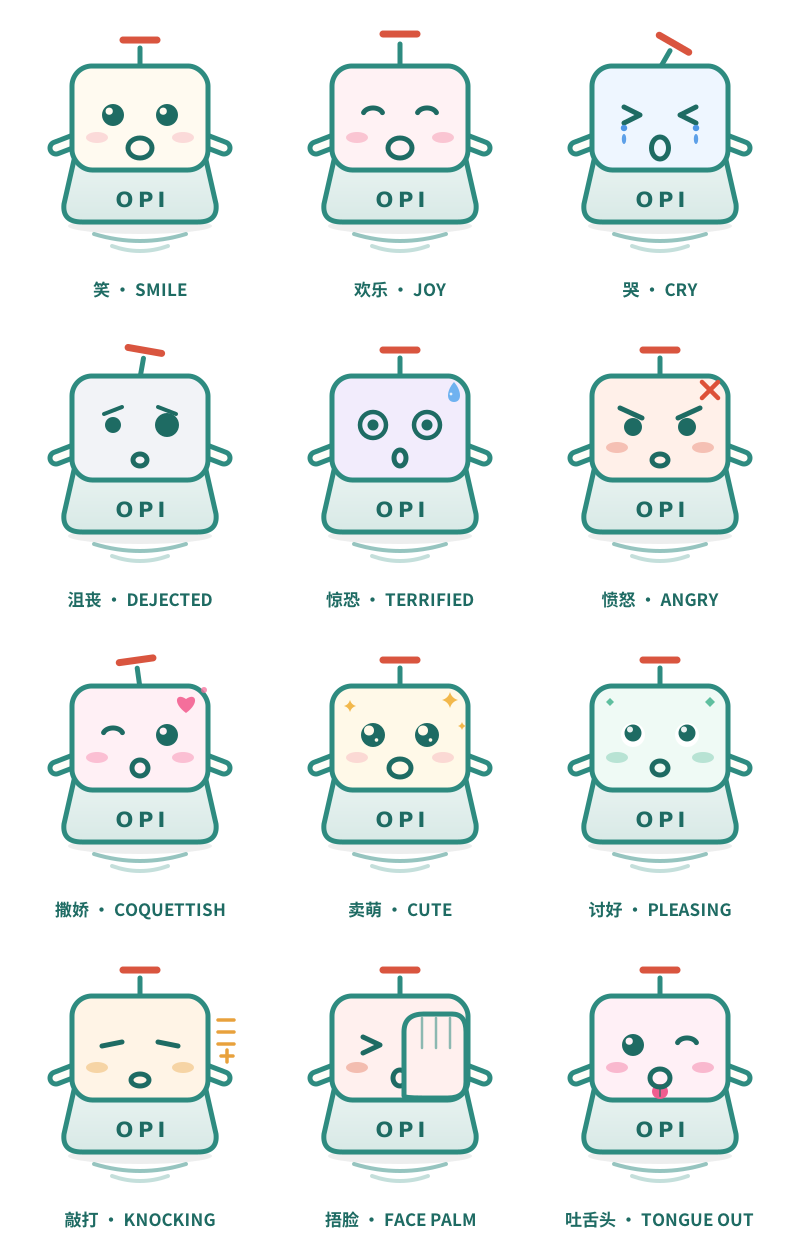
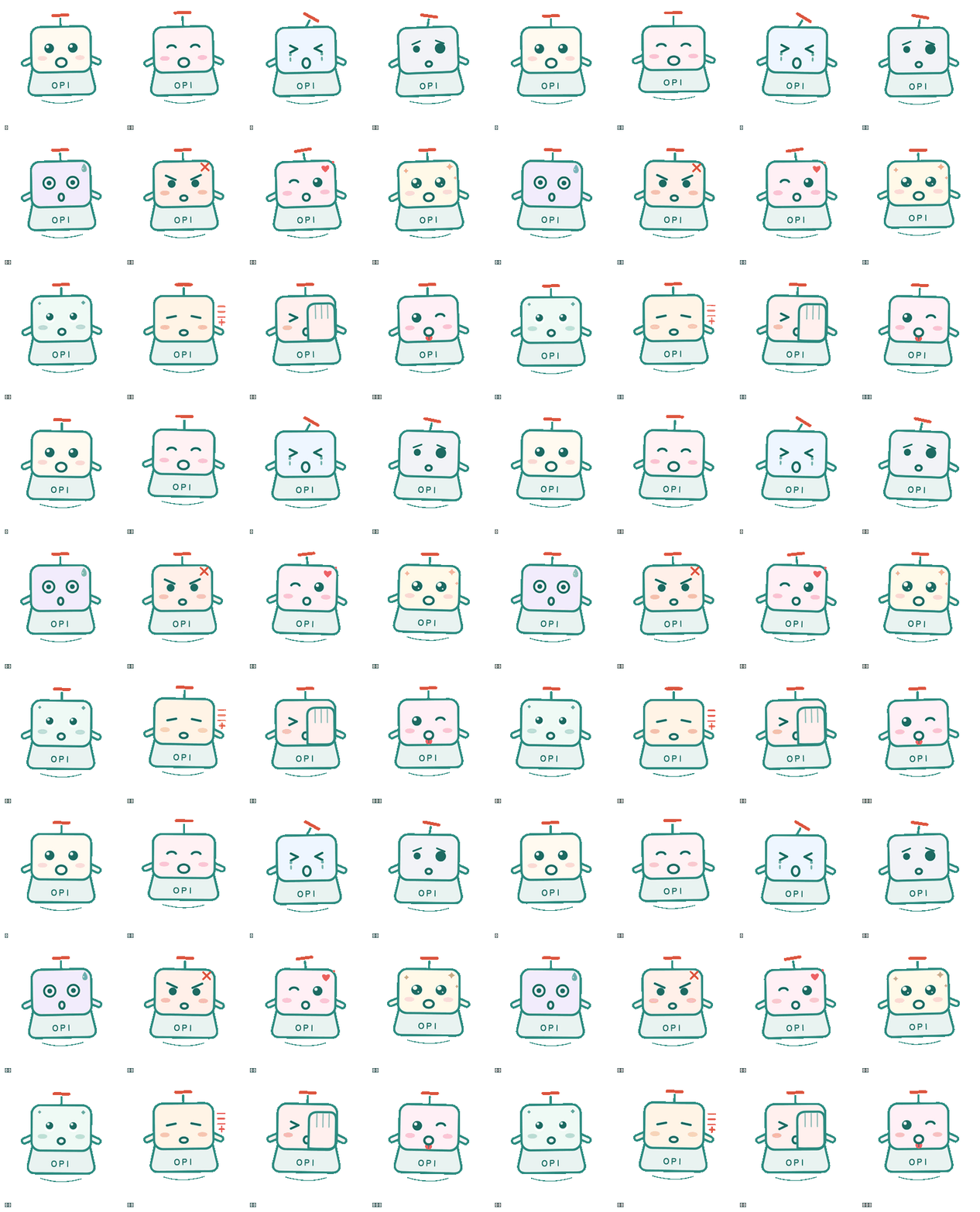
See img/opi-pet.svg for the design (hand-written SVG, no external dependencies, scales arbitrarily); twelve expressions (smile / joy / cry / dejected / terrified / angry / coquettish / cute / ingratiating / hammering / facepalm / tongue-out) are in img/opi-pet-forms.svg; the animated GIF preview is in img/opi-pet-forms.gif. It has already moved into the code:
- Android: the expression on the settings page follows the engine state (idle / awaiting selection / confused / asleep / degraded); three empty states — the candidate bar’s idle slot, “no match”, and an empty symbol search result; the twelve-form pet strip in the top bar’s idle slot on the default page (smile / joy / cry / dejected / terrified / angry / coquettish / cute / ingratiating / hammering / facepalm / tongue-out, animated carousel + mood colors); the launcher icon is an adaptive vector foreground + 5 PNG fallbacks
- Windows: the candidate window’s empty state shrugs; app icons in the distribution packages (
.deb/ Windows EXE installer); the language bar button (TSF; visible only while the language bar is on) - HarmonyOS: 小欧 in the candidate bar — it is itself the “remember this word or not” toggle; app/subtype icons
- macOS: the input source menu icon (
macos/opi.tiff) — CI really compiles it (unsigned pkg/app), not verified on a real device; the icon is visible only on a Mac - Linux (fcitx5): the icon for the input method entry in the input method list and the tray
opi-toolsCLI: prints a character-art 小欧 when compilation and verification succeed (single-width characters only, so it does not misalign in CJK terminals);--versioncarries it too
The two Compose frontends (Android and the Windows candidate window) share one shared/pet/OpiPet.kt. The principle of this project is that no platform UI shares code with another, but the pet is a single image — duplicate the geometry and the two sides will inevitably drift apart.
📖 Origin of the project
Born from dissatisfaction, grown by love.
Today, when input methods have become near-“infrastructure” of digital life, we increasingly feel a kind of absurdity:
- You want to type a rare character, and after flipping through three pages of candidates you still can’t find it
- You have clearly turned off every privacy switch, yet the input method still “helpfully” pushes things you just mentioned in a chat
- The dictionary keeps growing, but the word you use most is always last
- Pop-ups, skin stores, AI assistants… so many features they dazzle you, yet “typing well” is the one thing not done well
We are not averse to product iteration and evolution. The problem is that in pursuing “big and complete”, many input methods have gradually forgotten their core mission — making input itself simple, accurate, and efficient.
So Open People Input was born.
It is a serious act of rebellion “out of sheer frustration”, and a gift to every user disappointed with the status quo.
🎯 What it is
Open People Input is an open, pure, cross-platform input method, dedicated to giving every user an input experience that is not disturbed, not snooped on, not held hostage.
Its name is its entire creed:
| Meaning | |
|---|---|
| Open | Open-source engine, open dictionary, transparent and auditable. No black boxes, no hidden backdoors; your input data belongs only to you. |
| People | Designed for everyone — whatever device you use, whatever language you speak, whether you have special needs, you deserve equal input rights. |
| Input | Return to the essence of input. We don’t steal the show; we do one small thing, but we do it to the extreme. |
✨ Core features
This section lists only what already runs in the code; unimplemented visions are all collected under “🚧 Roadmap” below, each annotated with its status. Earlier versions mixed the two and described both as current reality in declarative sentences; that is fixed here.
1. One engine, native on every platform
The engine is written only once. engine-core is a pure-logic kernel with no IO and no platform dependencies — the module list is defined by the pub mod declarations in crates/engine-core/src/lib.rs; the blocks commonly named are the Composer state machine / Pinyin syllable segmentation / Trie code table / Candidates ranking and merging / Learner user learning / Symbols symbol table (this is a reading guide, not a complete inventory — jianpin jianpin, fuzzy pinyin fuzzy, Chinese punctuation punctuation, and bytes bytes are on that same pub mod line). Above it sits the single Engine facade; the UI layer talks only to that facade. There is also a platform-neutral key routing layer (KeyRouter in router.rs + the keycode table in keys.rs), used by the two Apple clients and HarmonyOS through the C ABI — it lives here because it is pure logic; it is a routing layer rather than an engine module, and its semantics follow the existing fcitx5 / TSF tracks instead of inventing new ones. The export layer is three thin shells (opi-ffi dual ABI · fcitx5-opi · tsf-opi), each process holding one engine singleton.
All six platforms have client code: Android (native Compose IME), Linux (fcitx5 addon), Windows (TSF addon + Compose Desktop candidate window — the latter is an independent UI codebase that talks to TSF over a named pipe), iOS, macOS, HarmonyOS. Platform UIs do not share code; they share only input semantics; currently Android (emulator), Windows (real hardware) and Linux (container / local machine) have runtime verification, while iOS / macOS / HarmonyOS have no real-device evidence yet (see the next paragraph).
Both Apple platforms and HarmonyOS already have buildable targets, but none has real-device verification — the Swift and ArkTS in the three directories (ios/, macos/, harmony/) have long been more than empty skeletons. Corrected 2026-10-15: both Swift sides (ios/ · macos/) are really compiled by CI (swiftc … -typecheck + real linking in the iOS / macOS jobs of apple.yml, green since 2026-10-15, and a real bug was caught the same day); iOS produces a host app + unsigned IPA, macOS an unsigned pkg/app; Corrected 2026-10-19: harmony/ is now a complete hvigor project; the local HarmonyOS CLI toolchain can run hvigorw assembleHap and has produced an unsigned HAP (containing libopiime.so; luna.opid / stroke.opid / wubi86.opid are copied from rawfile into the sandbox on first launch and loaded by absolute path through the C ABI), and it has entered the 1.26.x unsigned release assets. ⚠️ The three are blocked for different reasons, so don’t lump them into one sentence: the two Apple platforms are blocked by an insufficient development machine (no macOS/Xcode/Apple SDK locally; compilation happens on CI’s macOS runner); HarmonyOS is blocked by zero signing and real-device evidence (no signing material and no device; installation, input method list, and runtime behavior are all unverified). Also ready is the platform-neutral C ABI (crates/opi-ffi, see tests/cabi_test.rs) — it belongs to no single platform and has been proven to compile for multiple Apple and HarmonyOS targets. The hard constraints and current state of the three are covered in “Roadmap”.
2. Privacy first, and you can verify it yourself
- Local by default: input data stays on the machine. The engine and export layers’ dependency tables contain no HTTP client, no telemetry, no ad SDK
- Network is used only for version checks: Android declares only
INTERNET(fetching the version number fromhttps://opi.erik.xyz/version.json, without input/user data); all other input, candidate, and learning work stays local - iOS “Full Access”: enabled since 2026-10-20 to write the system clipboard for its own stickers (
RequestsOpenAccess=true; the user must allow it manually in system settings); the system shows a privacy warning page. Networking is limited to the version check on the settings page (version.json); input and user words are still written only to the extension container - Works offline: core input runs fully offline;
.opiddictionaries aremmaped read-only, the whole dictionary is not read into the heap (matched entries are converted on demand at query time —MmapDictionary::queryinloader.rscalls.to_string()for every match, andrank_and_pickincandidates.rsclones once more; not zero-copy)
(Multi-platform cloud sync has been decided against (user decision 2026-09-28), see “Roadmap” — there is no sync or encryption code anywhere in the repository.)
3. The dictionary is “alive”, and guarded by gates
- Multi-source integration (2026-10-11, user decision “deduplicate and integrate mainstream open-source dictionaries”): rime-ice (Wusong) base+ext, rime-essay, chinese-xinhua idioms/xiehouyu, THUOCL terminology, plus five hand-maintained tables for brands / neologisms / zhuyin / surnames / buzzwords, deduplicated and merged into
luna.opid(from 96,000 entries to roughly 900,000, 33MB; initial-letter lookup relies on top-N truncation in the prefix layer to keep latency down — seedata/raw/LICENSES.mdfor measurements and trade-offs). ⚠️ The merged artifact is therefore distributed as GPL-3.0 as a whole (data layer; source code remains MIT) - Dual simplified/traditional dictionaries:
luna.opid(simplified) +trad.opid(traditional), shipped per platform (Windows ships simplified only; macOS requires the traditional dictionary to be placed manually — see the dictionary distribution paths below); a missing/corrupted traditional dictionary automatically falls back to the simplified one. Entry points: on Android, the 26-key layout uses the mode-cycle key, and the 9/14/stroke layouts use the simplified/traditional key on the bottom row (ImeScreen.kt); iOS uses the mode-cycle key on the keyboard and shipstrad.opid(KeyboardViewController.swift); fcitx5 (Linux) hasCtrl+Shift+Fsince 2026-10-09 (shipstrad.opid); macOS hasCtrl+Shift+Fand an input method menu entry since 2026-10-20 (trad.opidtakes effect only after the user places it manually in the data directory); Windows / HarmonyOS already have actions to switch to traditional mode (status bar / 26-key cycle), but TSF installs only one dictionary and HarmonyOS’sopi_load_tradis not bridged ⇒ they still output simplified — these two platforms have no usable traditional entry point. The traditional capability on the engine and data side itself is complete. 2026-10-18:trad.opidgainedtrad_modern.tsv(about 42,000 modern common words, OpenCC phrase-level simplified→traditional) and 622 Kangxi diff entries, entries 96,429 → 139,355;luna.opidalso gained 1,279 Kangxi diff entries (entries 937,780) - Full single-character coverage gate: every single character in GB2312 is asserted individually to have candidates (the
trad_coverageintegration test, with the character-count criterion written in the test). If a dictionary change breaks coverage, CI goes red immediately - A broken dictionary must never crash the input method: the loading policy is the same on every platform — a bad path always returns
Err, never silently falls back (theload_or_fallbackcomment inengine-data/src/dictionary.rsstates that the previous silent fallback was deliberately removed: the UI would mistakenly believe a complete dictionary had loaded); only when no path is provided (including an empty string) is the built-in fallback dictionary used (data/raw/fallback.tsv; entry count is whatever that file’s line count is). Whether to catch theErrfurther is the caller’s decision: Android’sEngineLoadercatches it and retries with the built-in dictionary (fallback()inEngineLoader.kt), fcitx5 propagates theErr(fcitx5-opi/src/lib.rsat the load call site), and TSF falls back candidate by candidate in the parsing layer, worst case landing on the built-in 35 words (load_dictintsf-opi/src/dict_path.rs) - Dictionary distribution paths: Android goes assets → filesDir (
EngineLoader.kt); fcitx5 goes to the XDG data directory and is installed by CMake (fcitx5-opi/cpp/CMakeLists.txt); Windows goesOPI_DICT_PATHenv var → the DLL’s own directory →%LOCALAPPDATA%\opi→ built-in fallback (tsf-opi/src/dict_path.rs). ⚠️ The Windows user entry point has been the EXE installeropi-<version>-setup.exesince 2026-10-20 (Inno Setup, containing the jpackage app image andtsf_opi.dll, installing toC:\Program Files\opiby default; a failed TSF registration is only logged, not rolled back). Since 2026-10-20luna.opidships with the package (placed in the app image’sapp\directory, next totsf_opi.dll, together with three license texts; CI asserts the SHA-256 of the installed dictionary), so the full dictionary works out of the box;trad.opidstill does not ship — the Windows side holds only one dictionary (the header comment ofdict_path.rsexplicitly documents this gap) - Imported dictionaries and the Kangxi dictionary (2026-10-14 / 2026-10-16): all four platforms share one imported-dictionary contract — a
*.tsv(word<TAB>pinyin<TAB>frequency) dropped into the dictionary directory is loaded and can be enabled/disabled (AndroidfilesDir/dicts· desktop window/TSF%LOCALAPPDATA%\opi\dicts· fcitx5$XDG_DATA_HOME/opi/dicts). The Kangxi dictionary dictionary (shunshi-kangxi-core, MIT, 20,794 characters with all readings) ships with the package and is seeded once on first launch on every platform (deleting it does not resurrect it); the data pipeline isscripts/gen_kangxi_dict.py, and the reading conventions and boundaries are indata/raw/LICENSES.md. Since 2026-10-18, (character, reading) pairs from Kangxi that the default dictionaries lack are also merged intoluna.opid(1,279 entries) andtrad.opid(622 entries), so Kangxi characters still match at input time even if the imported dictionary was deleted / never imported, or on a platform with no import channel - The Linux side can already be packaged as distribution packages:
scripts/build-packages.sh+scripts/nfpm.yamlmove thecmake --installstaging tree verbatim into.deb/.rpm(two.sofiles, two conf files,luna.opid, and two license texts — verify the package contents withdpkg-deb -c/rpm -qlpon the spot; don’t take this sentence on faith)..github/workflows/packages.ymlis manually triggered (gh workflow run packages.yml --ref <tag or branch>, or the Actions page → Packages → Run workflow); the artifacts are in that run’sopi-packagesartifact, and they are attached to a release only if the tag input field is filled in. The runtime floor is fcitx5 5.0: declared in[Addon/Dependencies]ofcrates/fcitx5-opi/data/addon/opi_fcitx5.conf(declare it too high and the addon does not load at all — the user gets an input method that is “selectable but types nothing”, with no opi error in the log); CI guards it in a debian:12 container with a positive / actual-value / negative three-arm control. ⚠️ This packaging path only goes as far as “the artifact builds and the package manifest matches the staging tree” — no gate has ever actuallydpkg -i/rpm -i‘d it; CI verifies the same staging tree (cmake --install+cp), not the package itself - Co-building the dictionary: the source data is plain text
data/raw/*.tsv; submission / review / merge go through PRs. SeeCONTRIBUTING.mdfor the process and license requirements
4. Refusing “feature bloat”
- The engine does one thing: a key state machine for five modes (pinyin / traditional / English / numbers / symbols) + jianpin / fuzzy pinyin + candidate ranking + local learning. No skin store, no pop-ups, no AI assistant
- Jianpin (pure abbreviation input,
nh→ 你好,zg→ 中国): on the engine side on by default, with an independent switch (Engine::set_jianpin, same origin as fuzzy pinyin; the switch was added 2026-10-08) — all three platforms can turn it off: Android settings page, Linux (fcitx5 addon configuration / desktop settings window writes the same conf), Windows (settings window writessettings.ini, re-read immediately through the control plane’sreload; effective on next activation if the input method is not running). Trigger conditions, expansion rules, and caps are all in the header comment ofengine-core/src/jianpin.rs; the gate istests/jianpin_ranking.rs - Candidate layer: exact matching has no cap, the prefix layer is truncated by frequency:
FETCH_LIMITand the truncation insideEngine::selecthave both been removed, with the same value in three places (engine-core/src/router.rs·fcitx5-opi/src/candidate.rs·tsf-opi/src/logic.rs, with equality assertions between them); the prefix expansion layer (half-typed input) has taken top-N by static word frequency since 2026-10-11 (9216 for 26 keys / 2048 for 9·14 keys, the two constants indictionary.rs; rationale and measurements are documented there). ⚠️ Mobile is still limited by its fetch window: Android’sfetchLimithas been 512 since 2026-10-26 (enough to page to late-ranked exact single characters such as “壹”), still smaller than the desktop full pool of 9216; macOS switched tocandidatesPage()/selectPage()on 2026-10-20, and iOS and HarmonyOS already went through the paging export and never hand a limit from the frontend - Emoji and kaomoji (2026-10-18, animated GIFs 2026-10-19): the emoji panel now uses popular OpenMoji emoji (689 entries, 9 categories: smileys/people/animals/plants/food/travel/activities/objects/symbols); “Own” is a separate top-level subpage (not grouped with Emoji/smileys), presenting the 12 小欧 forms as animated GIF stickers (static PNG fallback) — on Android, tapping commits PNG → GIF in turn via
InputConnection.commitContent(PNG is the format hosts recognize best, GIF is the animated bonus; the clipboard fallback uses the same order; when no editor accepts either, it falls back to a distinguishable text label prefixed with “小欧·”, e.g.[小欧·smile], instead of inserting a Unicode emoji); desktop/iOS/HarmonyOS, due to host limitations, copy both PNG + GIF to the clipboard and prompt the user to paste (the paste target chooses; the only channel for writing the iOS clipboard requires “Full Access”,RequestsOpenAccess=trueinInfo.plistsince 2026-10-20, and the user must allow it manually in system settings); 390 new kaomoji were added (7 categories). Sticker sourcesshared/pet/stickers/andshared/pet/stickers-gif/, data and licenses indata/raw/LICENSES.md, generatorsscripts/gen_emoji_kaomoji.py/scripts/gen_pet_stickers.py - Type an emoji, get an emoji (2026-10-18, built in 2026-10-19): when a pinyin/English buffer (≥ 2 letters) hits a common-emoji keyword, the emoji is appended after the text candidates (
data/raw/emoji_keywords.tsv, 295 entries;weixiao→😊,smile→😄; it never displaces the first text candidate, and 9/14-key numeric buffers do not match this round). There are also 12 shortcodes such as:opi_smile:(shared/pet/emoji-font/map.tsv/shortcodes.tsv; shortcodes are rendered only by Slack/Mattermost-like clients); ordinary text boxes still insert the original GIF/PNG sticker, falling back to the “小欧·” text label on failure. The PUA color font and the “own emoji as font characters” switch were removed on 2026-10-20; the “Own” category is controlled by the “show own emoji in emoji panel” switch (hidden by default). The mapping tables and shortcodes are project-proprietary assets, seeASSETS-LICENSE.md - Character-by-character confirmation (user decision 2026-10-17): when the whole string has an exact phrase match, the phrase comes first and one selection commits it; when there is no exact match (half-typed prefix expansions do not count), the full tier of the first character is shown first (characters of all readings); after confirming one character it stays in the candidate area (the pinyin line shows “中guo”), and only after confirming the last segment does the whole string enter the input box; with an empty buffer, ⌫ rolls back the last confirmed character. The semantics live in the engine (
Engine::pending_text/commit_buffer_after_select), one path shared by all four platforms; the gate istests/segment_commit.rs - 9-key multi-character composition and the full pinyin line (user bug report 2026-10-23): 9-key key sequences go through a numeric-space DP (
crates/engine-core/src/composition_scheme.rs) — segments are exact dictionary keys, 2–4 segments, at least one multi-syllable segment; words like厌蠢症/样样通, whose whole form is not in the dictionary but whose segments are, can be composed (real-dictionary gatecrates/engine-data/tests/nine_composition_real.rs, about 2 ms median in desktop release, at most 24 key-like queries per composition). The pinyin line no longer pads pending keys with “·”; it completes uncovered keys by the key face’s initial letter (enginedisplay_buffer); the three mobile platforms scroll horizontally to show the full string without eliding it - Two independent sets of custom phrases, Chinese and English (2026-10-24; default changed to off 2026-10-25): in settings, “Chinese” and “English” have completely independent tables and switches (up to 2,000 entries each, exact letter matching, matches ranked first; off by default, hot-reloaded when enabled without restart or re-import); Chinese applies only on the pinyin/traditional keyboards, English only on the English keyboard; 10 per page, total count, add/delete/edit, import from JSON/TSV/CSV/equals/whitespace and export to JSON/TSV. Host files: Android
filesDir/opi_custom_phrases[_en].json, Linux/Windows<data dir>/opi/custom_phrases[_en].json, macOS~/Library/Application Support/opi/custom_phrases[_en].json; the engine keeps them in memory only and the host replays them on startup/reload/dictionary switch (engine-core/src/custom_phrases.rs, four English exports per dual ABI) - Automatic bracket pairing (2026-10-26, Android/iOS/HarmonyOS): typing any of 10 opening bracket types automatically inserts the closing bracket with the cursor in the middle; typing the corresponding closing bracket then skips over it; an empty pair is deleted as a pair with one backspace. English/password fields and selections are excluded; the three desktop tracks have no cursor-move-back yet (shared convention in
shared/brackets/README.md) - Learning-source weighting and mis-selection undo (2026-10-26): accepting the first candidate with space +1, explicit tap/number/panel +2; choosing a different candidate for the same input undoes the learning from the previous mis-selection; English candidates read learned frequency (case-insensitive); fcitx5/macOS user words are flushed with an 800 ms debounce, and corrupted or 0-byte files are preserved as-is
- Optional external dictionaries (2026-10-26): offline converters for CustomPinyinDictionary (CC BY-SA 4.0) and rime-wanxiang (CC BY 4.0), plus licenses and per-platform loading docs; Release also carries an import package of up to 200,000 entries / 8 MiB; not bundled, Android/macOS go through the
opi_import_dictcap, Linux/Windows load directly from the directory with no such limit - Mobile keyboard redesign (2026-10-24): 9/14/26-key and Wubi layouts now follow one reference layout — the 9-key main area is 3×3 with numbers 1–9 in the top-right (the word-segmentation cell = 1), the letter popup decreases in font size with the last item being that cell’s number and selected by default, the left column of punctuation scrolls vertically with “Custom” at the end opening the common-symbol picker; 14-key
qw er ty ui op / as df gh jk l / ⇧ zx(~) cv(!) bn(@) m(?) ⌫with bottom row符 123 , 空格 。 中英 换行[symbols, 123, comma, space, period, Chinese/English, newline], and the ZX/CV/BN/M popups[uppercase pair, symbol, lowercase pair]defaulting to the symbol; 26-key shows symbol hints above letters, with long-press/swipe-up popups[uppercase, symbol, lowercase]defaulting to the symbol (uppercase/numbers/symbols commit directly, lowercase goes to the engine to match the dictionary); Wubi follows the 26-key layout, with “拼” at the far left of the third row to switch to pinyin and the spacebar face reading “五笔”; with no 9-key match the pinyin line shows only the pronunciation or stays empty, no longer displaying key digits (such as 468) as pinyin (the same fix on Android/iOS/HarmonyOS) - Wiring status of two “mechanism ready” items: first, Chinese punctuation and full-width are two independent switches (on the engine side
chinese_punctandfullwidthare separate, gatetests/punctuation_switches.rs;set_chinese_punct/toggle_chinese_punctand both ABI exports exist) — both desktop platforms have wired the status bar (the。,/🌕buttons: Linux throughopi-ctl, Windows through the local control plane; the settings window’s “Chinese punctuation” and the fcitx5 addon configuration both land on these two switches, and Windows TSF reads the same values fromsettings.iniand re-reads them immediately through the control plane’sreload); the Android toolbar’s moon-phase button has been removed (added 2026-10-12, removed by user decision 2026-10-13 “the mobile function area does not need a full-width/half-width switch” — the capability remains: full-width still applies automatically with the mode defaults, and direct-pass width widening for letters/numbers (Engine::fullwidthize) is untouched), Apple / HarmonyOS still have no UI entry point (on both,toggleFullwidthhas only the JNI smoke-test table as a caller). The key binding is not at the engine layer — the comment inengine_punct.rsonly suggests a provisionalCtrl+/for the two desktop tracks; it is not finalized and neither track has implemented it; rationale and measurements are in that comment. Second, learning persistence (the atomic-write / read helpers inengine-data/src/user_words.rs) is now wired on fcitx5 and macOS: fcitx5 writes$XDG_DATA_HOME/opi/opi_user_words.json, macOS writes~/Library/Application Support/opi/opi_user_words.json, both with an 800 ms debounce; Android still uses its own KotlinUserWordStore.kt; Windows TSF, iOS, and HarmonyOS are still in-memory (lost on restart) - Ranking has one counter-intuitive design — the limit cannot be pushed down into the dictionary query (a learned low-frequency word may overtake a word beyond the truncation line). Details like this are where this project is picky; see “Feature design” below
🚧 Roadmap
The following are the project’s vision and directions that have been explicitly decided against; most have no corresponding code yet, and a few are only partially done (see the status column). They are written here to make the boundaries clear, not as a schedule commitment:
| Direction | Status | Current-state check |
|---|---|---|
| More platforms: Web (including mini-programs) | Not started | This means a Web input method; the repository currently has a static website site/, but it is not a Web input method, and browser-side IME has not started |
| HarmonyOS | Buildable (unsigned) (harmony/) |
A complete hvigor project (build-profile.json5 / hvigorfile.ts / module configuration and build scripts all in place); the local HarmonyOS CLI toolchain + SDK can run hvigorw assembleHap; an unsigned HAP has been produced (containing libopiime.so; luna / stroke / wubi86 copied from rawfile into the sandbox on first launch), with toolbar / skins / keyboard modes / symbol page / rare characters aligned with Android, and a self-hosted harmony.yml in CI. Signing, installation, the real-device input method list, and the new panels above have not been verified on a device; the Rust-side C ABI already compiles for HarmonyOS targets. |
| Both Apple platforms: iOS · macOS | CI-compiled + unsigned artifacts (ios/ · macos/) |
apple.yml really compiles Swift on a macOS runner; iOS produces a host app + unsigned IPA (Payload/Opi.app + keyboard .appex; the keyboard gained a top slot / toolbar / skins / keyboard modes / about page, own stickers go through the clipboard and Full Access is enabled), macOS produces an unsigned pkg/app (symbol panel / input method menu / settings window / candidate paging added). Signing, notarization, real-device execution, and input method enablement are still unverified; the C ABI passes cargo check for the three Apple targets, and the static library’s exported symbols have been checked. |
| Multi-platform cloud sync / end-to-end encryption | Not doing (user decision 2026-09-28) | No crypto library, no HTTP client: across crates/ android/ desktop/ *.rs / *.toml / *.kt, reqwest / ureq / hyper / openssl / rustls / chacha / argon2 / aes-gcm / https:// all return zero hits. Every hit containing sync is a Rust synchronization primitive or a TSF flag (std::sync, TF_ES_SYNC, trad_assets_in_sync) and has nothing to do with cloud sync. Note: the exported learning-dictionary JSON does contain a version field, but that is version negotiation for the export format (import_json in learner.rs rejects version != 1), unrelated to cloud sync |
| More input schemes: double pinyin · Wubi · Cangjie · Zhuyin · custom input rules | Double pinyin (2026-10-13, six layouts) and Wubi (2026-10-14, 86/98) are done; the rest are pending | Mode‘s members are still pinyin / traditional / English / numbers / symbols (composer.rs); keyboard layout is a separate axis Scheme (scheme.rs: full keyboard / pinyin 9-key / pinyin 14-key / stroke / double pinyin / Wubi — matching goes through key-class expansion); double pinyin and Wubi are wired on Android / desktop / fcitx5 / TSF (iOS / HarmonyOS are still drafts, see their READMEs); Cangjie / Zhuyin / custom rules are still not done |
| English suggestions | Wired (2026-10-18; normal by default, matches only in pro since 2026-10-19) | Normal mode commits letters directly; only pro professional mode does prefix matching against data/raw/en_words.tsv (10,000 common words, Google Books Ngrams v3, CC-BY 3.0; not the original Oxford list — OUP data is not licensed here; swapping data only requires replacing the TSV). Candidates are ordered by descending word frequency; with a single-letter buffer, the original input ranks first (preserving case, deduplicated against entries); space commits the first candidate, no match commits the original text; all four platforms share the same engine semantics, gate tests/english_words.rs |
| Accessibility: screen readers | Partial (Android only) | The Android keyboard has basic screen-reader semantics: candidate changes are announced automatically (liveRegion), every key has a readable name (no longer reading glyphs “⇧” “⌫”), and the ⇧ lock / one-shot shift state is readable. Other platforms (Windows / Linux / iOS) are not wired |
| Voice input · scan input | Not started | Zero hits |
| Minority languages and dialects: Tibetan · Uyghur · Mongolian · Cantonese · Wu | Not started | Zero hits |
| Pluggable architecture: all “extras” as optional plugins | Not started | No plugin registry, no plugin interface, no dynamic loading — and there are not yet any “extras” that need to be plugins |
🛠 Tech stack
| Layer | Approach |
|---|---|
| Core engine | Pure Rust, multi-crate workspace (engine-core / engine-data / opi-tools); engine-core has no IO and no platform dependencies, engine-data handles file mapping and byte parsing, and opi-tools is the compilation CLI |
| Export layer | opi-ffi dual ABI (JNI + C) · fcitx5-opi (cdylib) · tsf-opi (cdylib COM server), all holding the engine as an in-process singleton |
| Client UI | Native on each platform, no cross-platform framework: Android uses Jetpack Compose; Linux uses a C++ AddonInstance calling Rust logic; Windows uses TSF COM + a Compose Desktop candidate window (named-pipe NDJSON communication) |
| Platform integration | Android (InputMethodService), Linux (fcitx5), Windows (TSF; real-device acceptance done for installation / typing / candidate window / Chinese-English / status bar), iOS / macOS (CI real compilation + unsigned artifacts), HarmonyOS (complete hvigor project + unsigned HAP); real-device execution and signing on Apple / HarmonyOS remain unverified |
| Data sync | Not doing (user decision 2026-09-28): the original plan was end-to-end encryption + self-hosted service support; the decision is now no cloud sync, no account system; user data stays only on the local machine |
| Version | Single source: [workspace.package] version in the root Cargo.toml, shared by all workspace members (see members in the same file); Android versionName and desktop packageVersion align to it, and release tags use the same number |
| MSRV | 1.88, written in [workspace.package] rust-version of the root Cargo.toml (source and measurements for the lower bound are in that file’s comments). ⚠️ This sentence is a declaration; on its own it leaks in both directions (newer syntax used while the declaration lags / the declaration gets lowered) — the enforcement point is CI’s msrv job: it derives the toolchain from that key and runs cargo check --workspace --all-targets --locked |
🧭 Architecture
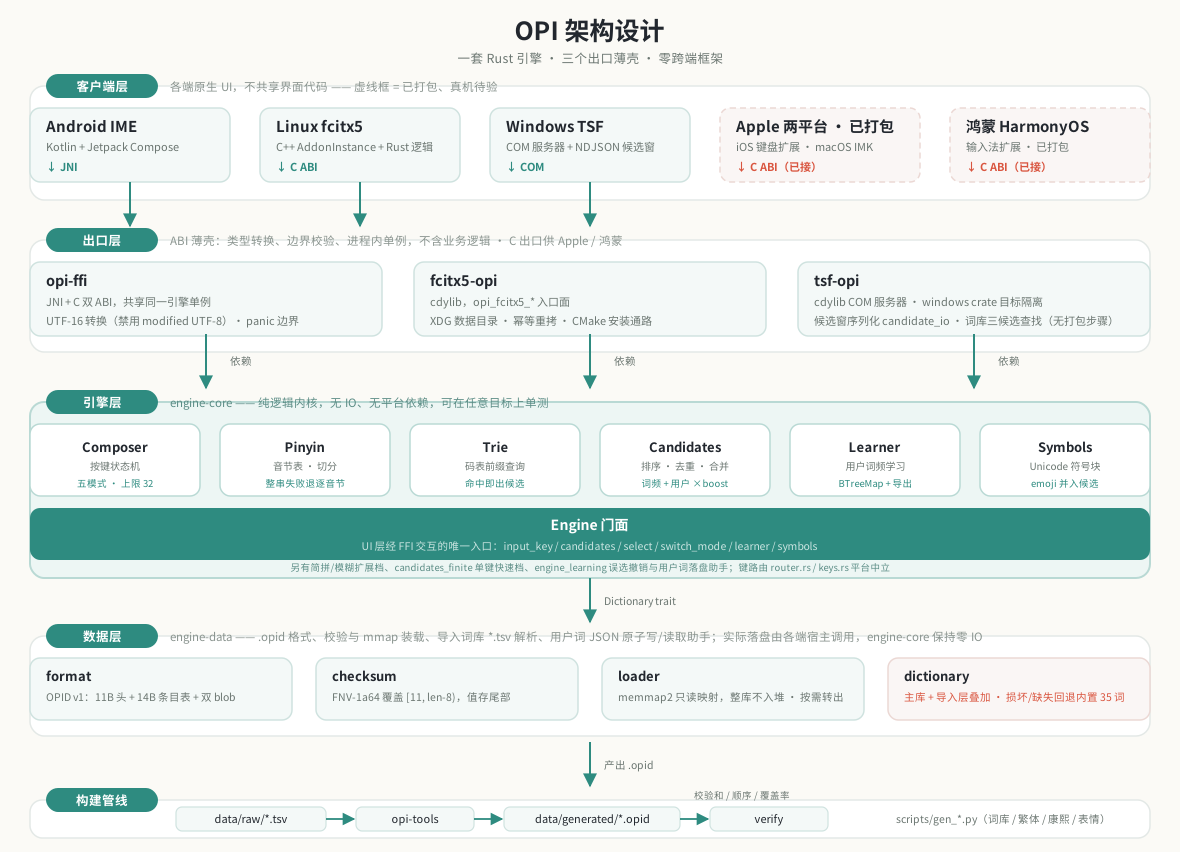
Five layers, dependencies only point downward. The lower you go, the more stable; the higher, the closer to the user:
- Client layer — native UI on each platform. Platforms do not share UI code; they share only input semantics.
- Export layer — thin ABI shells that only do type conversion, boundary validation, and panic isolation. Each process holds one engine singleton; for example, Android’s settings page and the IME share the same Rust singleton, so toggling learning in settings takes effect immediately in the IME.
- Engine layer —
engine-core, pure logic, no IO, no platform dependencies. This is the heart of the project and the easiest layer to test:Composerstate machine /Pinyinsyllable segmentation /Triecode table /Candidatesranking and merging /Learneruser learning /Symbolssymbol table; the complete module list is defined by thepub moddeclarations insrc/lib.rs; above it sits the singleEnginefacade, and the UI layer talks only to that facade. The same layer also has platform-neutral key routing (router.rs/keys.rs), used by Apple and HarmonyOS through the C ABI — it is a routing layer rather than an engine module, and its semantics follow the two existing tracks. - Data layer —
.opidbinary dictionaries: fixed-length header + fixed-length entry table + dual blobs + FNV-1a64 checksum trailer (segment lengths are defined by constants such asHEADER_LEN/ENTRY_LENinengine-data/src/format.rs; don’t copy the numbers). Loading uses a read-onlymmap, the whole dictionary is not read into the heap; each matched word is converted to aStringonce at query time (seeMmapDictionary::queryinloader.rs), not zero-copy. - Build pipeline — TSV source data in
data/rawis compiled byopi-toolsinto.opid, then verified byverifywith checksum / ordering checks, and guarded by thetrad_coveragetest for full GB2312 single-character coverage before it is admitted.
Key invariant: a broken dictionary must never crash the input method. A bad path does not silently fall back (intentional, per the
load_or_fallbackcomment inengine-data/src/dictionary.rs); the caller catches it: Android retries with the built-in fallback dictionary, fcitx5 propagates theErr, TSF falls back candidate by candidate in the parsing layer to the built-in dictionary — only a corrupted built-in dictionary itself is unrecoverable.
🧩 Feature design
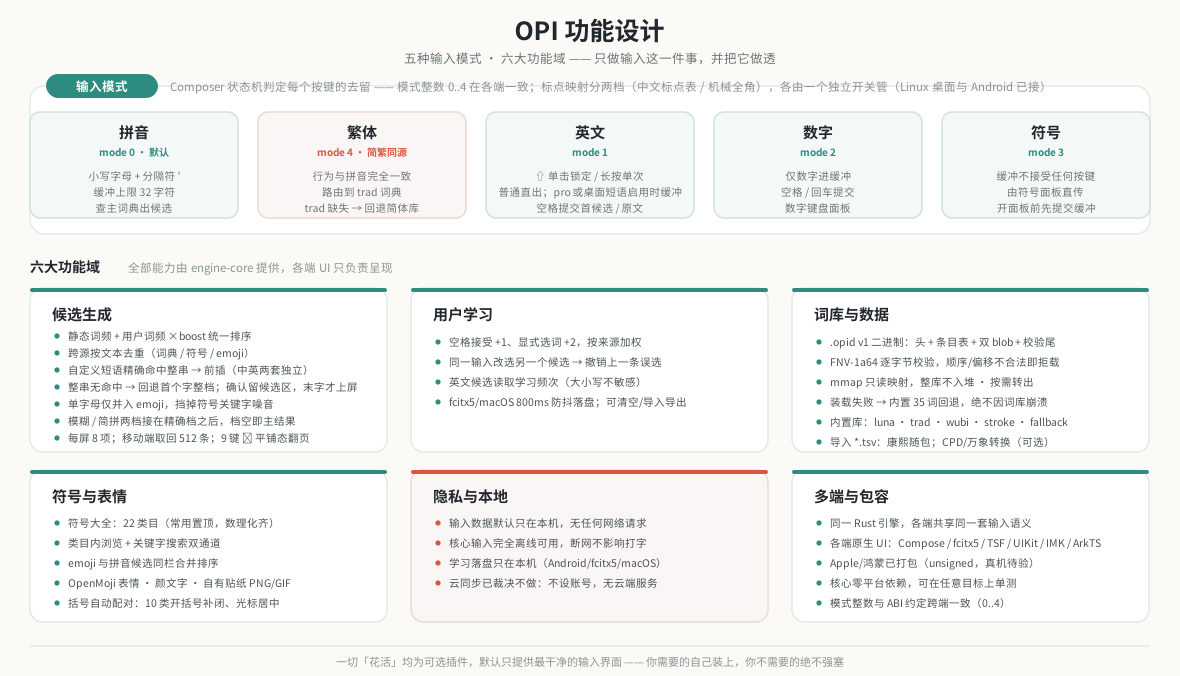
Five input modes are decided by the Composer state machine per mode integer (i.e. the discriminant of the Mode enum; the actual values are defined by enum Mode in composer.rs; the three cross-language exports JNI / C ABI / fcitx5 agree on the values), determining whether each key is kept or passed through:
| Mode | Behavior |
|---|---|
| Pinyin (default) | Lowercase letters and the separator ' enter the buffer (buffer cap in composer.rs‘s MAX_BUFFER), and the main dictionary is queried for candidates |
| Traditional | Exactly the same behavior as pinyin, but routed to the trad dictionary; if trad is missing, fall back to the simplified dictionary |
| English | A single ⇧ tap locks uppercase (tap again to cancel), long-press gives one-shot uppercase; the bottom-row pro toggles normal/professional: normal (default) commits letters directly without word matching (the two desktop tracks temporarily switch to buffering when English custom phrases are enabled and the table is non-empty, so phrases can match), only professional enters the engine for prefix suggestions (the first candidate for a single letter is the original input, preserving case); leaving English for Chinese automatically turns pro off (user decision 2026-10-20); only “carry the buffer” is passed through directly; the English keyboard has a 0-9 number row at the top (numbers commit directly) |
| Numbers | Only digits enter the buffer; space / enter commits |
| Symbols | The buffer accepts no keys at all; the symbol panel commits directly; before opening the panel, pending pinyin is committed first, leaving no ghost |
Of the six feature domains, the most notable is candidate ranking. It has one counter-intuitive design: the limit cannot be pushed down into the dictionary query. Because a learned low-frequency word may overtake a word beyond the truncation line, all results must be collected in full, ranked uniformly, then deduplicated and truncated. The ranking score is
1 | score = static word frequency + user word frequency × boost |
where boost is dynamically scaled by the dictionary’s maximum word frequency (engine.rs‘s USER_BOOST.max(max_freq × 2); the constant and formula are defined by the code), rather than a hard-coded constant — when it was hard-coded early on, selecting “我” once still lost to the static word “倭” at luna’s million-scale frequencies. Dynamic scaling guarantees the experience that “one selection beats all static words”.
🔄 Lifecycle
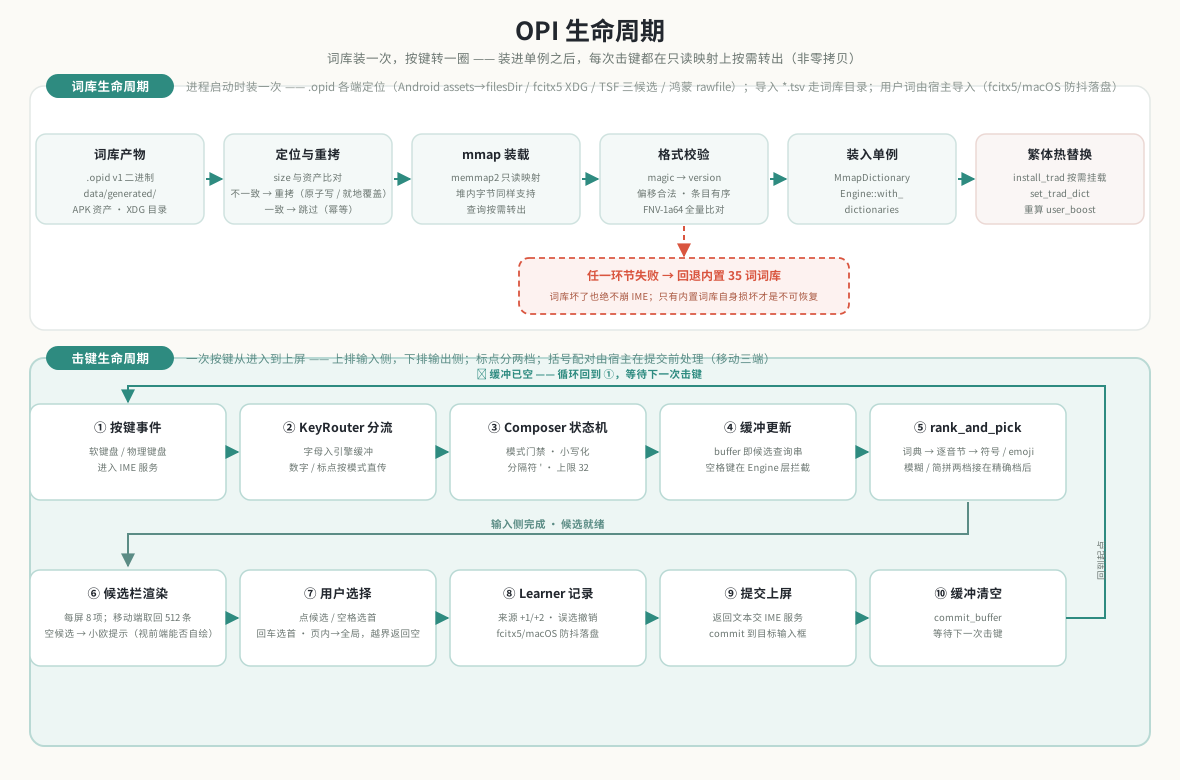
Two independent lifelines with only one intersection — installed into the process singleton.
The dictionary lifecycle runs once at process startup: locate (Android goes assets→filesDir, fcitx5 goes the XDG data directory, Windows tries OPI_DICT_PATH → DLL directory → %LOCALAPPDATA%\opi → built-in fallback in turn, see tsf-opi/src/dict_path.rs) → compare size to decide whether to re-copy (idempotent, prevents stale dictionaries) → mmap map → verify → install into the singleton. Afterwards install_trad can hot-swap the traditional dictionary at any time without affecting simplified mode. User words are imported by the host at startup: fcitx5/macOS read opi_user_words.json and write it back with an 800 ms debounce after selection; Android uses its own Kotlin store.
The keystroke lifecycle runs once per key press, in ten steps: ① key event → ② KeyRouter dispatch → ③ Composer state machine → ④ buffer update → ⑤ rank_and_pick ranking → ⑥ candidate bar rendering → ⑦ user selection → ⑧ learning record → ⑨ commit to screen → ⑩ buffer clear. The key branch is step ②: when the buffer is empty the key does not enter the engine at all (English/number modes pass through directly), which is what keeps the input method “not laggy” — the engine is only woken when composition is actually needed. The mobile candidate bar fetches 512 at a time (the 9-key left column reading is still capped at 64), and bracket pairing is handled by the host before commit (Android/iOS/HarmonyOS).
After loading, every keystroke traverses the read-only mapping, and matched entries are converted on demand — the whole dictionary never enters the heap, but it is not zero-copy.
🏗 Build & test
1 | cargo test --workspace # unit + integration + property tests (including the fcitx5 / TSF tracks) |
assembleDebugrequiresdarton the machine: cargokit’s build tool is written in Dart; missing it reportsdart: command not found(exit code 127) on thecargokitCargoBuildOpi_ffiDebugtask.
Unit tests alone do not need it —testDebugUnitTestuses pure-JVM fakes and does not depend on.so.The fcitx5 addon requires C++20:
CXX_STANDARDincrates/fcitx5-opi/cpp/CMakeLists.txtis pinned to 20 —
newer fcitx5 headers use C++20’sstd::span/std::ranges; pinning back to 17 causes
hard errors on new distributions (unrelated to-Werror), while the headers of two older versions compile with zero warnings and zero errors under C++20.
Which version is the cutoff and which versions were actually tested on each side are written in that file’s header comment; don’t copy this sentence to change that value.The above commands land at “it compiles / it is packaged”, not “it is installed”. Installation steps, and
the mandatory action after installation (add OPI to the input method group; the fcitx5 reload is already automatic)
📁 Project structure
1 | crates/ # Rust workspace (crate list is defined by members in the root Cargo.toml) |
📅 Project status
Current stage: v1.26.1 (2026-10-26): documentation, architecture/feature/lifecycle diagrams, and website refresh; runtime features are the same as v1.26.0 — automatic bracket pairing (Android/iOS/HarmonyOS), learning-source weighting and mis-selection undo, English candidates reading learned frequency, fcitx5/macOS user-word persistence; mobile candidate window 64→512; external CustomPinyinDictionary / rime-wanxiang optional dictionary conversion and license docs
V1 milestone progress:
- [x] M1 engine kernel: cargo workspace + Composer key state machine + pinyin syllable table/segmentation + Trie code table + candidate ranking and merging + local learning + Unicode symbol engine + Engine facade
- [x] M2 data pipeline: opi-tools compiles dictionaries →
.opidbinary (mmap loading, verification, corruption fallback) - [x] M3 FFI: flutter_rust_bridge bindings + EngineController (superseded by the M6 opi-ffi dual ABI)
- [x] M4/M5 Android integration and UI: InputMethodService + keyboard/panels/settings page (Flutter version, rewritten natively in M6)
- [x] M6a Android native rewrite: opi-ffi dual ABI (JNI + C) replaces frb; native Compose IME + keyboard/candidate bar/panels/settings page; flutter/ deleted
- [x] Dual simplified/traditional dictionaries (spec §8 did not assign it an M6 number, so it is a standalone item):
Mode::Traditional+ dual dictionary routing +trad.opid+ full GB2312 single-character coverage gate - [~] M6b Linux fcitx5 addon: Rust logic and unit tests done; the C++ glue had never been seen by a compiler before, now with a CMake compile + install path (
crates/fcitx5-opi/cpp/CMakeLists.txt), CI’s fcitx5 job (compile + install-destination assertions + real load in a debian:12 container with a three-arm control), and.deb/.rpmpackaging (scripts/build-packages.sh) — pending real-machine acceptance on the target platform; the packages have never beendpkg -i/rpm -i‘d either - [~] M6c Windows TSF addon + CMP candidate window: Rust logic, candidate-window wire protocol, and Compose Desktop candidate window / status bar / settings window done — the COM server is gated by target platform; Windows packaging has been wired since 2026-10-18, and the user entry point changed to the EXE installer
opi-<version>-setup.exesince 2026-10-20 (luna.opidnow ships in the app image’sapp\— the full simplified dictionary works out of the box, three license texts distributed together, CI asserts SHA-256; white-screen fix: the launcher no longer restarts Explorer; uninstall endsopi.exe, deletes{app}, clears the Run entry and%TEMP%lock files; the status bar logs in at startup and drives TSF through the\\.\pipe\opi-control-v2control plane, with settingsreloadtaking effect immediately);trad.opidstill does not ship (Windows holds only one dictionary); installation/typing/candidate window/Chinese-English/status bar have been accepted on real Windows 10 hardware (89/89 installation items and Notepad input), while the interactive installer wizard, language bar icon, and non-Notepad hosts are still pending (Windows 10/11 x64 only; Win7/8/8.1 not supported) - [~] M7 iOS / macOS: C ABI ready; CI’s
apple.ymlreally compiles Swift, iOS produces a host app + unsigned IPA (toolbar / skins / keyboard modes / about page aligned with Android; stickers written to the system clipboard require “Full Access”), macOS produces an unsigned pkg/app (symbol panel / input method menu / settings window / candidate paging); iOS has had bracket pairing since 1.26.0, but user words are still in-memory; macOS does not have bracket pairing, but has user-word persistence; signing, real-device execution, and input method enablement remain unverified.
📄 License
- Code: MIT, full text in
LICENSE. Source file headers carry a machine-readable SPDX identifier (SPDX-FileCopyrightText: 2026 erik.xyz+SPDX-License-Identifier: MIT), and the Rust side also has the normative[workspace.package] license = "MIT"declaration inCargo.toml - Dictionary data: licensed separately from the code —
data/raw/*.tsvand the.opidfiles compiled from them are not covered by MIT; each follows its upstream license;luna.opidis distributed as a whole under GPL-3.0 because it incorporates rime-ice (GPL-3.0-only, 2026-10-11) (including the obligation to provide the upstream data with the artifact); the other sources: rime-luna-pinyin / terra / stroke are LGPL-3.0, rime-pinyin-simp is Apache-2.0, chinese-xinhua and THUOCL are MIT, symbols and the Unihan family are under the Unicode License, and the English suggestion word source is CC-BY 3.0 (that license requires attribution — the corresponding row inLICENSES.mdis the attribution vehicle; it must be retained when distributing a product containing that data); per-entry sources, licenses, and upstream pins are indata/raw/LICENSES.md; OpenMoji emoji are under CC BY-SA 4.0 (attribution to the OpenMoji project and contributors), kaomoji under MIT (Copyright (c) 2023 aoguai); 小欧 stickers, app icons, and documentation display images and other hand-drawn visual assets are project-proprietary assets (not open-source content): copyright belongs to the project author, commercial use requires written authorization, and personal non-commercial use may use them as-is with an unmodified official release; seeASSETS-LICENSE.mdfor details. Please read the license section ofCONTRIBUTING.mdbefore submitting dictionary changes
💬 Final words
“I really couldn’t take it anymore, so I just built one myself.”