
I heard about the HBase distributed database a long time ago; today I’m going to try setting one up in Docker.
First, install and configure the Hadoop environment.
I shared that tutorial on Baidu Experience before; it’s for version 2.8, and now that I’ve looked at the latest Hadoop, the tutorial still works.
After installing Hadoop, don’t forget to configure SSH, the Java environment, and so on.
While you’re at it, create a user and group named hadoop (you can define your own too; if you don’t know how, go read up on creating Linux users and groups)
Standalone configuration
- Edit the HBase config file, add the following to conf/hbase-site.xml in the HBase directory
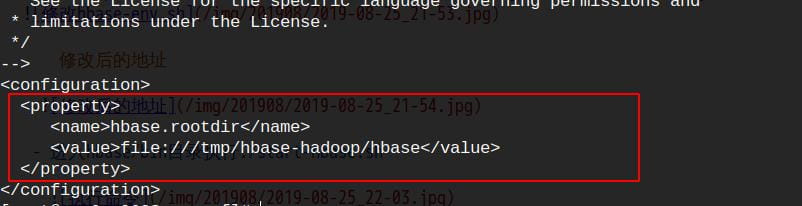
Note: change ${user.name} to your own hadoop username
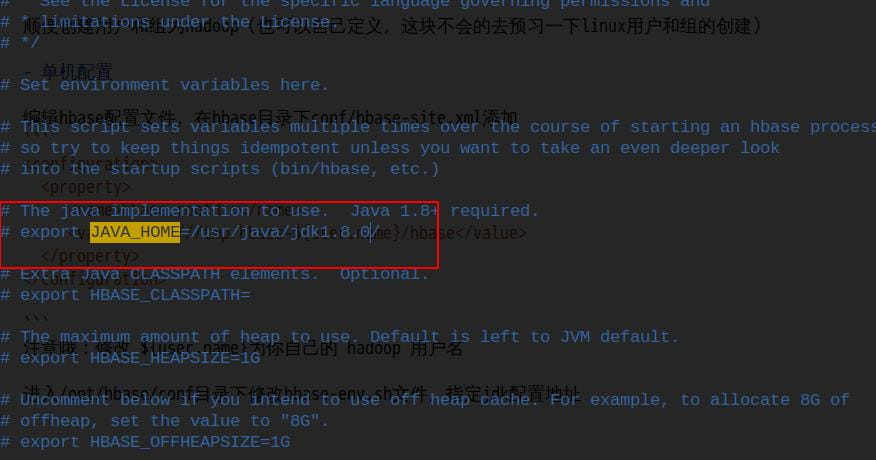
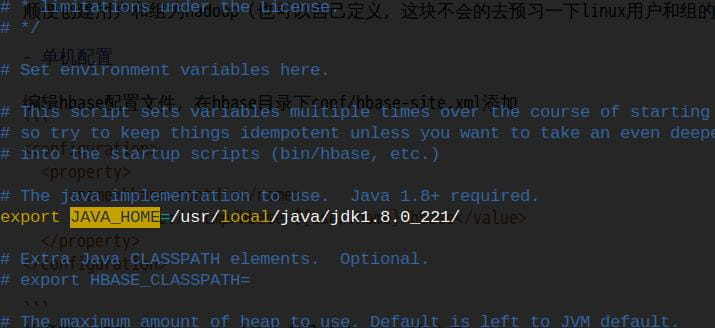
Go into the /opt/hbase/conf directory and edit the hbase-env.sh file. Remove the comment on the JDK path and change the JDK config path
The path after editing
- Go into the hbase/bin directory and run ./start-hbase.sh

Run jps to check the standalone process

Standalone mode is up; enter the command shell



