socket is a set of abstract APIs provided by the operating system for the communication layer
Function Introduction
socket_create(int $domain , int $type , int $protocol)
Returns a socket (communication endpoint) on success, and FALSE on failure. To read the error code, you can call socket_last_error(). That error code can be turned into a textual error description with socket_strerror().
Creates a communication node. socket_create contains three parameters
- $domain specifies which protocol is used for the current socket (communication node). There are three:
- AF_INET: IPv4 network protocol. Both TCP and UDP can use this protocol.
- AF_INET6: IPv6 network protocol. Both TCP and UDP can use this protocol.
- AF_UNIX: local communication protocol. High-performance, low-cost IPC (inter-process communication).
- $type selects the type used by the socket (communication node). There are five:
- SOCK_STREAM: provides a sequential, reliable, full-duplex, connection-based byte stream. It supports data transfer flow control. The TCP protocol is based on this streaming socket.
- SOCK_DGRAM: provides datagram support. (connectionless, unreliable, fixed maximum length). The UDP protocol is based on this datagram socket.
- SOCK_SEQPACKET: provides sequential, reliable, full-duplex, connection-oriented, fixed maximum length data communication; the data end reads the whole packet by receiving each data segment.
- SOCK_RAW: provides reading of raw network protocols. This special socket can be used to build any kind of protocol by hand. It is generally used to implement ICMP requests (such as ping).
- SOCK_RDM: provides a reliable data layer, but does not guarantee the order of arrival. Most operating systems have not implemented this.
- $protocol sets the specific protocol under the $domain socket (communication node). This value can be read with the getprotobyname() function. If the required protocol is TCP or UDP, you can use the constants SOL_TCP and SOL_UDP directly.
- icmp: Internet Control Message Protocol, mainly used by gateways and hosts to report erroneous data communication.
- udp(SOL_UDP): User Datagram Protocol, a connectionless, unreliable message protocol with a fixed maximum length.
- tcp(SOL_TCP): Transmission Control Protocol, a reliable, connection-based, data-stream-oriented full-duplex protocol
- $domain specifies which protocol is used for the current socket (communication node). There are three:
socket_set_option ( resource $socket , int $level , int $optname , mixed $optval )
Returns TRUE on success, or FALSE on failure.
Sets the socket options of a socket
- $socket: socket (communication node)
- $level: specifies the protocol level at which the option resides
- $optname: the available socket options are the same as the socket_get_option() options
- $optval: option value
socket_read ( resource $socket , int $length [, int $type = PHP_BINARY_READ ] ) read up to length bytes from a socket
- $socket: socket (communication node)
- $length: the length of the buffer in the socket resource
- $type: optional type parameter
- PHP_BINARY_READ the default value, safely reads binary data
- PHP_NORMAL_READ reading stops
socket_getpeername ( resource $socket , string &$address [, int &$port ] ) query the remote socket
- $socket: socket (communication node)
- $address: address to query
- $port: port to query (not required)
socket_recv ( resource $socket , string &$buf , int $len , int $flags ) receive data from a connected socket
- $socket: socket (communication node)
- $buf: the data fetched from the socket will be saved in the variable specified by buf
- $len: at most len bytes of data will be received
- $flags: can be any combination of the following flags:
- MSG_OOB handle out-of-band data
- MSG_PEEK receive data from the beginning of the receive queue without removing it from the receive queue.
- MSG_WAITALL block before at least len bytes of data have been received, and pause the script (block)
- MSG_DONTWAIT if this flag is specified, the function will not block, even if a blocking setting is specified globally
socket_select ( array &$read , array &$write , array &$except , int $tv_sec [, int $tv_usec = 0 ] ) system call on the given array of sockets with a specified timeout
- $read: monitors the sockets listed in the read array
- $write: will monitor the sockets listed in the write array to see whether writes will not block
- $except: will watch the sockets listed in the except array for exceptions.
- $tv_sec: tv_sec and tv_usec together form the timeout parameter. The timeout is the upper bound on the amount of time that passes before socket_select() returns. tv_sec may be zero, causing socket_select() to return immediately. This is very useful for polling. If tv_sec is NULL (no timeout), socket_select() can block indefinitely.
- $tv_usec same as above
socket_accept ( resource $socket ) accept a connection on a socket
socket_write ( resource $socket , string $buffer [, int $length = 0 ] ) write to a socket
- $socket: socket (communication node)
- $buffer: the buffer to write.
- $length: optional parameter, length
socket_close
TODO: close a socket resource Function prototype: void socket_close ( resource $socket )
- socket: a resource produced by socket_accept or socket_create; it cannot be used to close stream resources
stream_socket_server
Since the process of creating a SOCKET is always socket, bind, listen, PHP provides a very convenient function that creates, binds the port and listens on the port all at once
Function prototype: resource stream_socket_server ( string $local_socket [, int &$errno [, string &$errstr [, int $flags = STREAM_SERVER_BIND | STREAM_SERVER_LISTEN [, resource $context ]]]] )
- local_socket: protocol name://address:port number
- errno: error code
- errstr: error message
- flags: use only part of the functionality of this function
- context: a stream context resource created with the stream_context_create function
socket communication example
<?php


class SocketServer
{
    protected $address;
    protected $port;

    public function __construct($address = '127.0.0.1', $port = '8080')
    {
        $this->address = $address;
        $this->port = $port;
    }

    public function startSocket()
    {
        $socket = socket_create(AF_INET, SOCK_STREAM, SOL_TCP);
        socket_bind($socket, $this->address, $this->port);
        socket_listen($socket);
        for ( ; ; ) {
            $conn = socket_accept($socket);

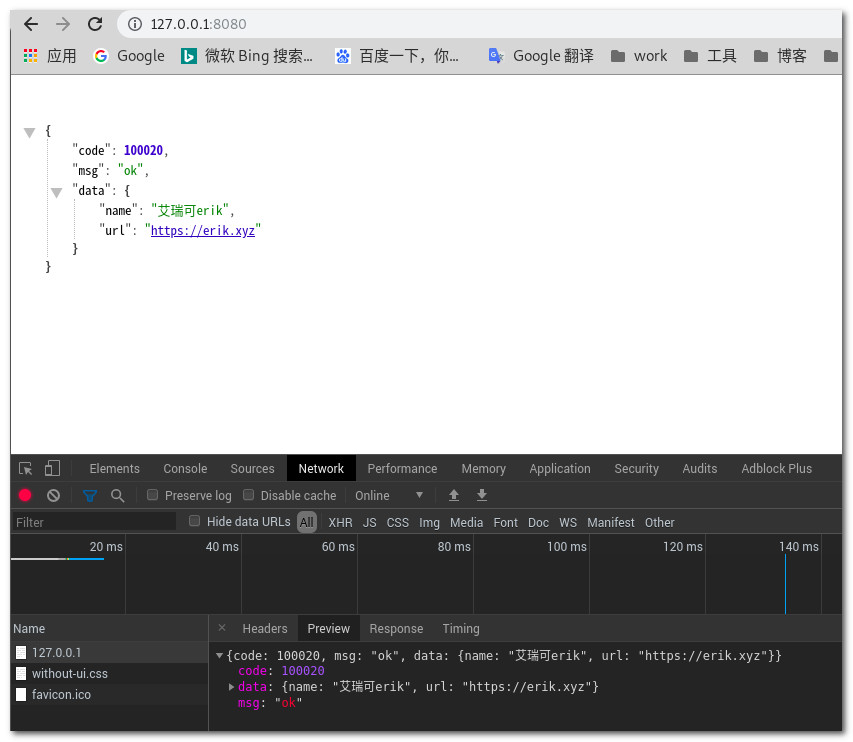
            $write_buffer = "HTTP/1.0 200 OK\r\nServer: my_server\r\nContent-Type: text/html; charset=utf-8\r\n\r\n{'code':100020,'data':{'name':'艾瑞可erik','url':'https://erik.xyz'},'msg':'ok'}";

            socket_write($conn, $write_buffer);

            socket_close($conn);
        }
    }

    public function run(){
        $this->startSocket();
    }
}

$sock=new SocketServer();
$sock->run();
Running result:
You can also use stream, that is, a stream-based implementation.
<?php
      class StreamSocketServer
      {
          protected $address;
          protected $port;

          public function __construct($address='127.0.0.1',$port=8080)
          {
              $this->address=$address;
              $this->port=$port;
          }

          public function startSocket(){
              $socket=stream_socket_server("tcp://".$this->address.":".$this->port,$errno,$errstr);
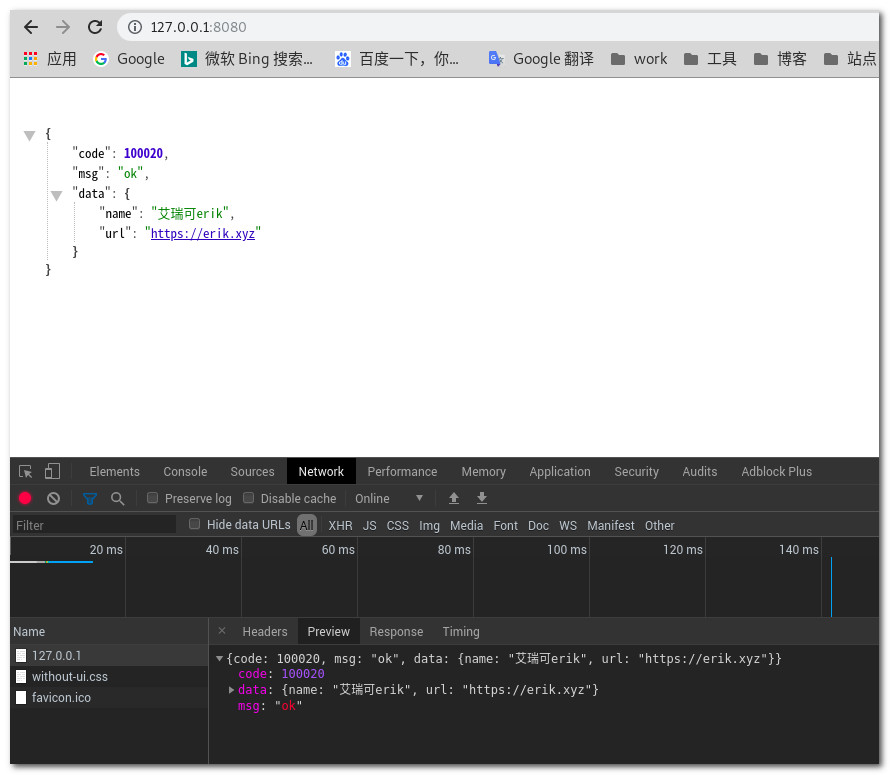
              $data="{'code':100020,'msg':'ok','data':{'name':'艾瑞可erik','url':'https://erik.xyz'}}";
              for ( ; ; ) {
                  $conn = stream_socket_accept($socket);

                  $write_buffer = "HTTP/1.0 200 OK\r\nServer: my_server\r\nContent-Type: text/html; charset=utf-8\r\n\r\n".$data;

                  fwrite($conn, $write_buffer);

                  fclose($conn);
              }
          }

          public function run(){
              $this->startSocket();
          }
      }

      $socket=new StreamSocketServer();
      $socket->run();
Multiple Processes
Multiple process example
<?php
header("Content-type:text/html;charset=utf-8");

class ProcessTest
{

    public function add(){
        $pid=pcntl_fork();

        if($pid){
            echo "这是一个父进程\n";
            pcntl_waitpid($pid,$status);
        }elseif ($pid==0){
            echo "这是子进程\n";
        }else{
            die("进程结束\n");
        }
    }

    public function run(){
        $this->add();
    }
}

$process=new ProcessTest();
$process->run();
Running effect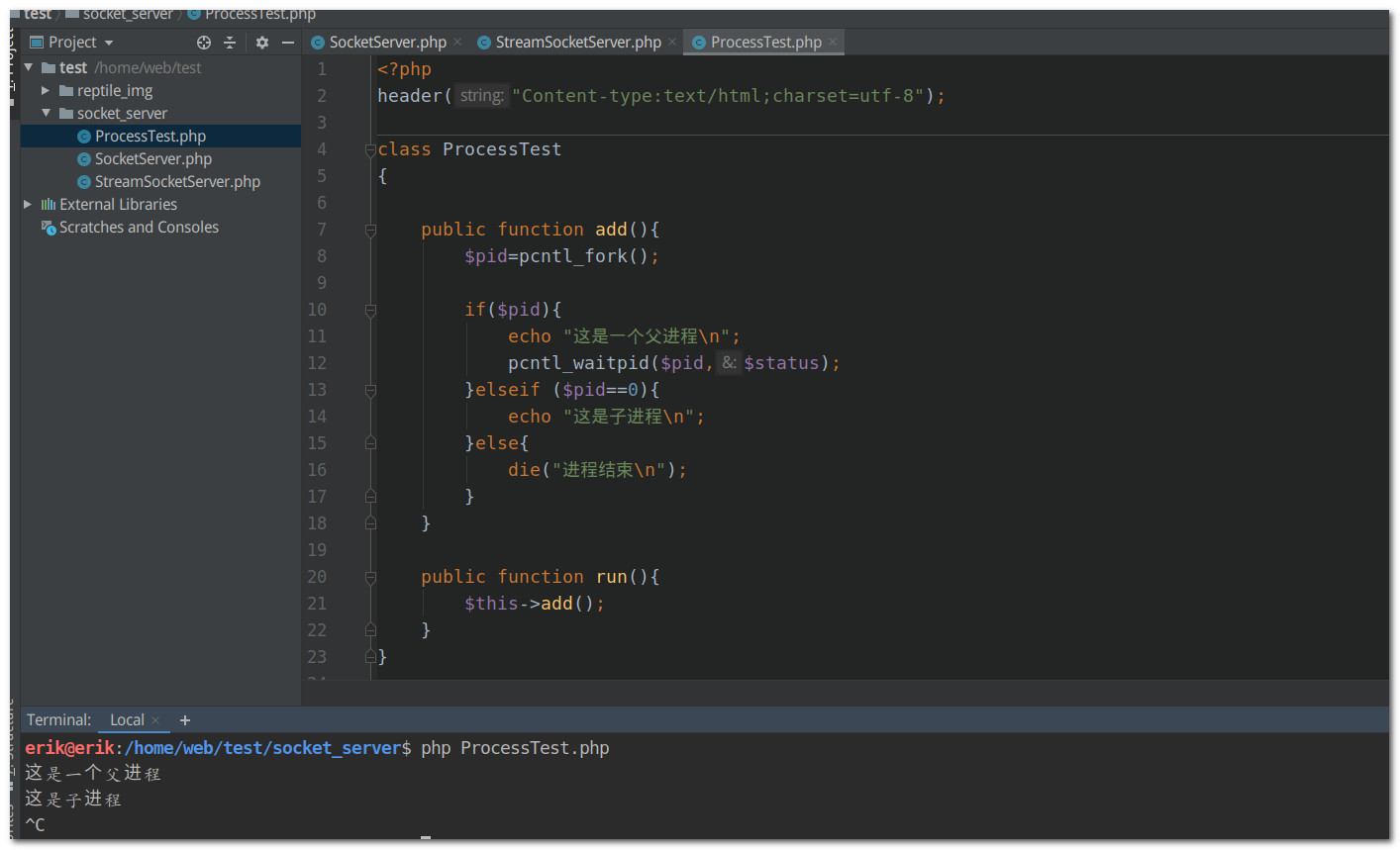
pcntl_fork
Function prototype: int pcntl_fork ( void )
Executing this function copies the current process to produce another process, called the child process of the current process. The return value of this function differs between the parent process and the child process: in the parent process it returns the process ID of the forked child process, while in the child process the return value is 0.
Note that when a process is copied, the process’s data is copied (heap data, stack data and static data), including the file descriptors opened in the parent process, which are also open in the child process. This means that when you use a large amount of memory in the parent process, the forked child process must have an equal amount of memory resources, otherwise the fork may fail.
pcntl_waitpid
Function prototype: int pcntl_waitpid ( int $pid , int &$status [, int $options = 0 ] )
- pid: process ID
- status: the exit status of the child process
- option: depends on whether the operating system provides the wait3 function; if it does, this option parameter takes effect.
The process above still has flaws, and isn’t very suitable for handling multiple tasks.
So use a very simple leader-follower model: create a process pool, randomly pick one process as the leader process, which listens for whether there is a new connection; if there is, another follower is promoted to leader to keep listening, while the original leader process goes off to handle the request of the new connection
socket multitask example
<?php


class StreamSocketServer
{
    protected $address;
    protected $port;

    public function __construct($address='127.0.0.1',$port=8080)
    {
        $this->address=$address;
        $this->port=$port;
    }

    public function startSocket(){
        $socket=stream_socket_server("tcp://".$this->address.":".$this->port,$errno,$errstr);
        $data="{'code':100020,'msg':'ok','data':{'name':'艾瑞可erik','url':'https://erik.xyz'}}";
        $pids=[];
        for($i=0;$i<10;$i++){
            $pid=pcntl_fork();
            $pids[]=$pid;
            if($pid==0){
                for ( ; ; ) {
                    $conn = stream_socket_accept($socket);

                    $write_buffer = "HTTP/1.0 200 OK\r\nServer: my_server\r\nContent-Type: text/html; charset=utf-8\r\n\r\n".$data;

                    fwrite($conn, $write_buffer);

                    fclose($conn);
                }
                exit("结束了\n");
            }
        }

        foreach ($pids as $pid){
            pcntl_waitpid($pid,$status);
        }
    }

    public function run(){
        $this->startSocket();
    }
}

$socket=new StreamSocketServer();
$socket->run();
Running result

Running 10 tasks is no problem, but multiple processes consume CPU resources. If there are many tasks and processes keep increasing, the server cannot bear it. At that point multiple processes are no longer suitable for handling large concurrency. So use IO multiplexing.
IO Multiplexing
Blocking / non-blocking
These two concepts refer to the state of the process during IO: blocking IO means that before the call result is returned, the current thread is suspended; conversely, non-blocking means that before the result can be obtained immediately, the function will not block the current thread but returns immediately.
Synchronous / asynchronous
These two concepts refer to how the call returns a result: synchronous means that when a function call is issued, the call does not return until the result is obtained; conversely, after an asynchronous call is issued, the caller cannot get the result immediately — the part that actually handles the call notifies the caller through status, notification and callbacks once it is done.
Blocking and non-blocking
Before introducing IO multiplexing techniques, let’s introduce blocking and non-blocking first. In the WEB servers of the previous sections, calling the socket_accept function blocks the whole process until there is a new connection, and only then does the operating system wake the process to continue. In non-blocking mode, stream_socket_accept behaves differently: if there is no new connection, it will not block the process but return false immediately.
I/O multiplexing
Multiplexing (IO/Multiplexing): to improve the efficiency of data transmission over network communication lines, the technique of establishing multiple logical communication channels on one physical communication line and transmitting several signals at the same time is called multiplexing technology. For Sockets, any model that can handle multiple connections at the same time should be called multiplexing. The more commonly used IO models nowadays are select/poll/epoll/kqueue (there are also IO models like Apache’s, which uses a separate process/thread for each connection, but their efficiency is relatively poor and they break easily, so we won’t introduce them for now). Among these multiplexing modes, the asynchronous blocking/non-blocking modes have the best scalability and performance.
select polling
Using select polls the connection pool: when a connection is readable or writable, the select function returns the number of readable and writable connections, and then it polls the connection pool once more to find active connections and perform read and write operations
socket_select only supports socket-type resources, not stream-type resources, so here you need to use socket_create to create the socket resource
select polling example
<?php

class SocketServer
{
    protected $address;
    protected $port;

    public function __construct($address = '127.0.0.1', $port = '8080')
    {
        $this->address = $address;
        $this->port = $port;
    }

    public function startSocket()
    {
        $socket = socket_create(AF_INET, SOCK_STREAM, SOL_TCP);
        socket_bind($socket, $this->address, $this->port);
        socket_listen($socket);
        $reads = [];
        $clients = [];
        $writes = null;
        $exceptions = null;
        socket_set_nonblock($socket);
        $write_buffer = "HTTP/1.0 200 OK\r\nServer: my_server\r\nContent-Type: text/html; charset=utf-8\r\n\r\n{'code':100,'data':{'name':'艾瑞可erik'},'msg':'ok'}";
        for (; ;) {
            $reads = array_merge(array($socket), $clients);
            $activity_counts = socket_select($reads, $writes, $exceptions, 0);
            if ($activity_counts > 0) {
                if (($conn = socket_accept($socket)) !== false) {
                    $clients[] = $conn;
                }
            }
            $this->client($clients,$write_buffer);
        }
    }

    /**
     * @param $clients
     * @param $write_buffer
     */
    public function client($clients,$write_buffer){
        $length = count($clients);
        for ($i = 0; $i < $length; $i++) {
            $client = $clients[$i];
            if (($read_buff = socket_read($client, 1024))!=false) {
                socket_write($client, $write_buffer);
                socket_close($client);
                break;
            }
        }
    }

    public function run()
    {
        $this->startSocket();
    }
}

$sock = new SocketServer();
$sock->run();
Although select can monitor multiple connections, it can monitor at most 1024 connections. This was improved in poll, but select and poll both essentially monitor by polling, which means that when tens of thousands of connections are being monitored, even if only one connection is active, all tens of thousands of connections still have to be traversed. Obviously this is an enormous waste of performance, and the arrival of epoll solved this problem completely
epoll
epoll is not implemented by a single function, but by several functions. We won’t discuss the epoll-related functions here, because PHP does not provide them — but it does provide the libevent extension based on the libevent library, as well as the event extension based on the libevent library. The libevent library implements the Reactor model; here we only give a simple introduction to the Reactor model.The Reactor model contains several components: handles, an event dispatcher, and event handlers.
- A handle is a file descriptor; in Socket programming it is the socket resource created with socket_create.
- The event dispatcher runs an event loop; the event loop is implemented through IO multiplexing techniques such as epoll
SelectPoll, listening for whether the event a handle expects has occurred, and dispatching the event to the event handler if it has. - The event handler processes the relevant logic when the event occurs.
The libevent library already implements the Reactor model; just install the event extension.
Example
<?php

$address = '127.0.0.1';
$port = 8080;

//创建句柄
$data = "{'code':100020,'msg':'ok','data':{'name':'艾瑞可erik','url':'https://erik.xyz'}}";
$write_buffer = "HTTP/1.0 200 OK\r\nServer: my_server\r\nContent-Type: text/html; charset=utf-8\r\n\r\n" . $data;
$socket = @stream_socket_server("tcp://" . $address . ":" . $port, $errno, $errstr);
stream_set_blocking($socket, 0);
//创建事件循环器
$event_base = new EventBase();
//创建事件,并指定事件监听的事件类型及注册事件处理器
$event = new Event($event_base, $socket, Event::READ | Event::PERSIST, function ($socket) use (&$event_base, $write_buffer) {
    $conn = stream_socket_accept($socket);
    fwrite($conn, $write_buffer);
    fclose($conn);
}, $socket);
//向循环器中添加事件
$event->add();
$event_base->loop();
Running a request in the browser, or checking it with a tool.
Running result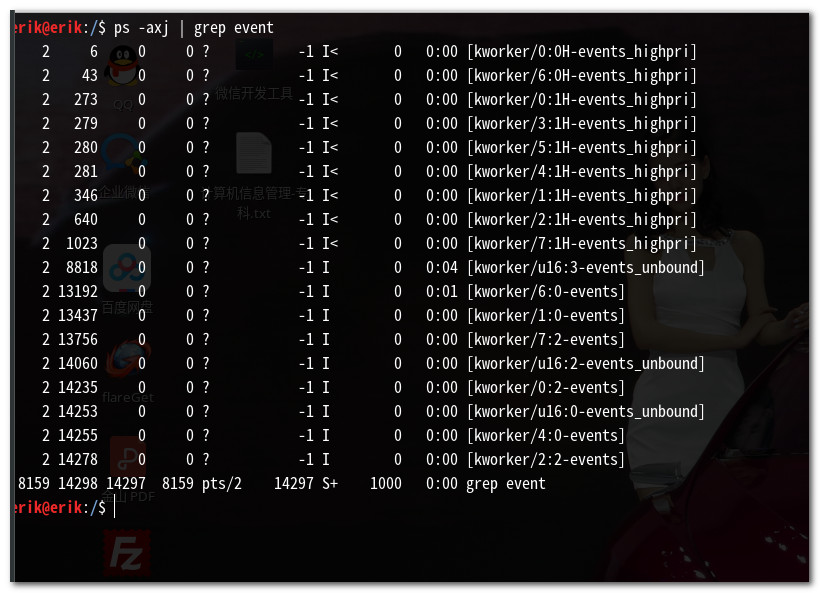
At this point a question needs to be considered: what if the process dies?
Then you need process guarding.
Generally, processes with PPID 0 are kernel-mode processes. Generally, processes with PPID 1 are daemons
The standard process for creating a daemon
To turn the WEB server process into a daemon, becoming a daemon has several standard steps:- Set the file creation mask, generally to 0, umask(0)
- pcntl_fork a child process and exit immediately; the purpose is to let the child process inherit the process group ID and obtain a new process ID, which ensures that the child process is definitely not the process group leader, because a process group leader cannot create a new session
- posix_setsid creates a new session and a new process group, becomes the session leader and process group leader, and detaches from the original controlling terminal, so the process will not be interrupted by control signals from the original terminal
- pcntl_fork: forking once more is not mandatory, but on System-V based systems some people suggest forking again to avoid opening terminal devices, making the program more portable.
Daemon example
 <?php
  header('Content-type:text/html;charset:utf-8');
  //守护进程
  function daemon(){
      umask(0);
      //创建进程,并退出进程
      if(pcntl_fork()){
          exit("退出进程\n");
      }

      //创建新的会话和进程组,并退出原来的控制端
      posix_setsid();

      //再次创建进程,并退出
      if(pcntl_fork()){
          exit("再次创建进程,并退出\n");
      }
  }
  daemon();

  $address = '127.0.0.1';
  $port = 8080;

  //创建句柄
  $data = "{'code':100020,'msg':'ok','data':{'name':'艾瑞可erik','url':'https://erik.xyz'}}";
  $write_buffer = "HTTP/1.0 200 OK\r\nServer: my_server\r\nContent-Type: text/html; charset=utf-8\r\n\r\n" . $data;
  $socket = @stream_socket_server("tcp://" . $address . ":" . $port, $errno, $errstr);
  stream_set_blocking($socket, 0);
  //创建事件循环器
  $event_base = new EventBase();
  //创建事件,并指定事件监听的事件类型及注册事件处理器
  $event = new Event($event_base, $socket, Event::READ | Event::PERSIST, function ($socket) use (&$event_base, $write_buffer) {
      $conn = stream_socket_accept($socket);
      fwrite($conn, $write_buffer);
      fclose($conn);
  }, $socket);
  //向循环器中添加事件
  $event->add();
  $event_base->loop();
Running result
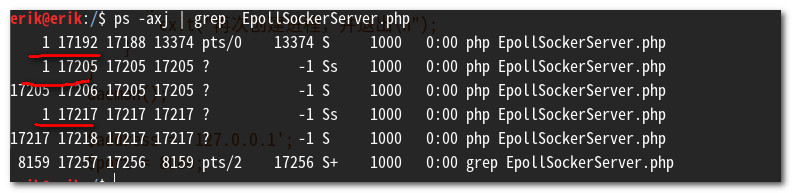
So now that we have a daemon, how do we restart or stop it? Call a function to send a signal
posix_kill
Function prototype: bool posix_kill ( int $pid , int $sig )- pid: process ID
- sig: a system-predefined signal constant
pcntl_signal
Function prototype: bool pcntl_signal ( int $signo , callback $handler [, bool $restart_syscalls = true ] )- signo: a system-predefined signal constant
- handler: the signal handler, a callback function
- restart_syscalls: whether the system call is re-invoked when the process is interrupted by a signal during a system call; generally defaults to true
So based on the steps above, let me put together an integrated version. The complete version of socket processes and multi-process control
EventServer
 <?php

class EventServer
{
    public $event_base;
    public $events = [];

    public function __construct()
    {
        $this->event_base = new EventBase();
    }

    public function add($fd, $what, $callback, $callback_arg)
    {
        $event = new Event($this->event_base, $fd, $what, $callback, $callback_arg);
        $this->events[intval($fd)] = $event;
        $event->add();
    }

    public function remove($fb)
    {
        $event = $this->events[intval($fb)];
        $event->free();
    }

    public function loop()
    {
        $this->event_base->loop();
    }
}
StreamServer
<?php

require "EventServer.php";

class StreamServer
{
    protected $ip = '127.0.0.1';
    protected $port = 8080;
    protected $path = './pid.txt';
    protected $event;
    protected $data = "{'code':100020,'msg':'ok','data':{'name':'艾瑞可erik','url':'https://erik.xyz'}}";
    protected $write_buffer = "HTTP/1.0 200 OK\r\nServer: my_server\r\nContent-Type: text/html; charset=utf-8\r\n\r\n";


    public static function daemon()
    {
        umask(0);

        $pid = pcntl_fork();

        if ($pid) {
            exit(0);
        } elseif ($pid < 0) {
            die("进程启动失败\n");
        }

        $sid = posix_setsid();

        $pid = pcntl_fork();

        if ($pid) {
            exit(0);
        } elseif ($pid < 0) {
            die("进程启动失败\n");
        }

        if ($sid < 0) {
            die("创建服务失败\n");
        }
    }

    public function __construct($ip, $port = 80)
    {
        $this->ip = $ip;
        $this->port = $port;
        $this->event = new EventServer();
    }

    /**
     * 启动
     */
    public function run()
    {
        if ($GLOBALS['argc'] > 1) {
            $this->sendSignal();
            exit(0);
        } else {
            self::daemon();
        }

        $this->installSignalHandler();
        $this->recordPid();
        $this->start();
    }

    //存储信号
    public function sendSignal()
    {
        if (posix_kill($this->getPid(), 0)) {
            if (strpos($GLOBALS['argv'][1], "stop") !== false) {
                posix_kill($this->getPid(), SIGUSR1);
            }
        }
    }

    //启动进程
    public function start()
    {
        $domain = sprintf("tcp://%s:%d", $this->ip, $this->port);

        $fd = stream_socket_server($domain, $errno, $errstr);

        if (!$fd) {
            die("$errno $errstr\n");
        }

        stream_set_blocking($fd, 0);

        $this->event->add($fd, Event::READ | Event::PERSIST, [$this, 'requestHandler'], $fd);

        $this->event->loop();
    }

    /**响应信息
     * @param $fd
     */
    public function requestHandler($fd)
    {
        $write_buffer = $this->write_buffer . $this->data;
        $conn = stream_socket_accept($fd);
        fwrite($conn, $write_buffer);
        fclose($conn);
    }

    //添加信号
    public function installSignalHandler()
    {
        $this->event->add(SIGUSR1, Event::SIGNAL, [$this, "handler"], SIGUSR1);
    }

    /**终止信号
     * @param $signo
     */
    public function handler($signo)
    {
        switch ($signo) {
            default:
            case SIGUSR1:
                $this->event->remove($signo);
                $this->stop();
                break;
        }
    }

    public function stop()
    {
        exit("终止信号\n");
    }

    public function getPid()
    {
        return file_get_contents($this->path);
    }

    private function recordPid()
    {
        file_put_contents($this->path, posix_getpid());
    }
}

$server = new StreamServer("127.0.0.1", 8080);
$server->run();
Running result