
In development, we often run into a requirement like this: export images from the database to the local machine, then pass them on to someone else.
1. Normally I would do it like this:
Through an interface or a scheduled task
Read from an Oracle or MySQL database
Use FileOutputStream to store the Base64-decoded byte[] locally
Walk the local folder and upload the images to a third-party server over FTP

The site blew up!
The actual data volume was enormous — by the statistics, roughly 400G of images needed exporting.
The feedback from the people on site was that it had already been running for 12 hours and was still going, with no idea when it would finish.
Stop it? Then the earlier work was wasted. Don’t stop it? No idea when it would finish.
That won’t do — it’s too slow. A simple task shouldn’t be the death of us, right?1
2
3
4
5
6
7
8
9
10
11
12
13
14
15
16
17
18
19
20
21
22
23
24
25
26
27
28
29
30
31
32
33
34
35
36
37
38
39
40
41
42
43
44@Value("${months}")
private String months;
@Value("${imgDir}")
private String imgDir;
@Resource
private UserDao userDao;
@Override
public void getUserInfoImg() {
try {
// Get the month table to export
String[] monthArr = months.split(",");
for (int i = 0; i < monthArr.length; i++) {
// Get the images from the month table
Map<String, Object> map = new HashMap<String, Object>();
String tableName = "USER_INFO_" + monthArr[i];
map.put("tableName", tableName);
map.put("status", 1);
List<UserInfo> userInfoList = userDao.getUserInfoImg(map);
if (userInfoList == null || userInfoList.size() == 0) {
return;
}
for (int j = 0; j < userInfoList.size(); j++) {
UserInfo user = userInfoList.get(j);
String userId = user.getUserId();
String userName = user.getUserName();
byte[] content = user.getImgContent;
// Download the image locally
FileUtil.dowmloadImage(imgDir + userId+"-"+userName+".png", content);
// Upload the downloaded image to the third party via FTP
FileUtil.uploadByFtp(imgDir);
}
}
} catch (Exception e) {
serviceLogger.error("获取图片异常:", e);
}
}
2. Who wrote this? Optimize it with overtime right now — will someone be held accountable?
After an hour of careful thought, the reasons for the slowness were probably these:
Querying the database
The program is serial
base64 decoding
Images written to disk
FTP upload to the server
Optimization 1: Add the corresponding index in the database to speed up queries
Optimization 2: Export using added indexes + async + multithreading
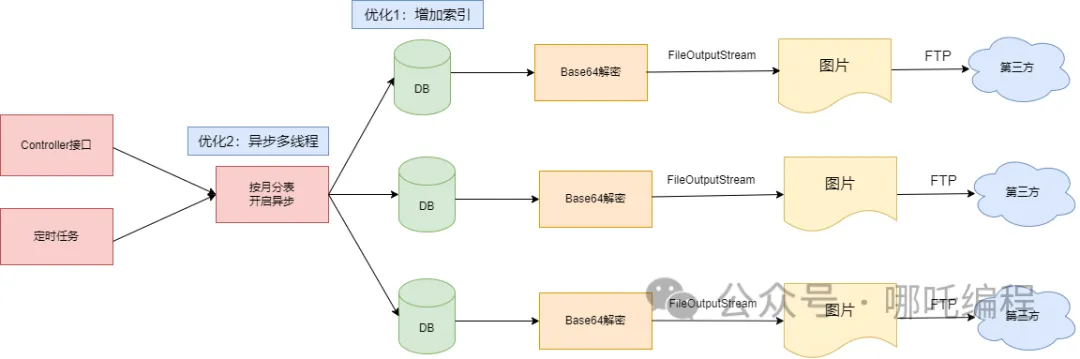
Optimization 3: No decoding + no disk writes, hand the images straight to the third party over FTP
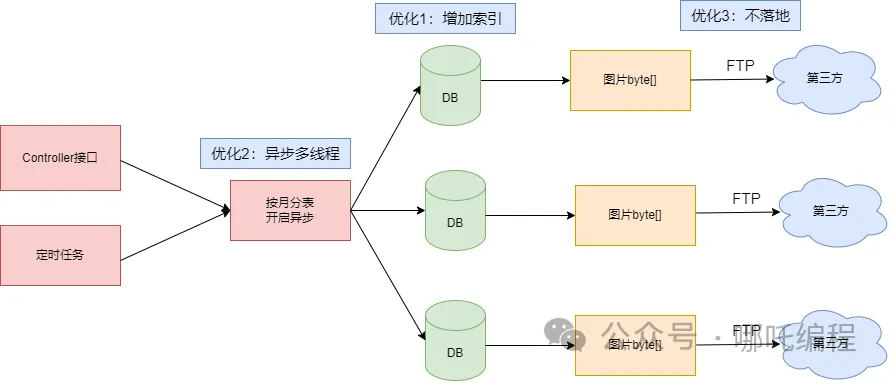
After using indexes + async + no decoding + no disk writes, exporting and uploading 40G of images went from over 12 hours to 15 minutes. Would you believe it?
Almost the same code, and yet such a huge gap in efficiency.
Below is the key code for exporting images without writing them to disk.1
2
3
4
5
6
7
8
9
10
11
12
13
14
15@Resource
private UserAsyncService userAsyncService;
@Override
public void getUserInfoImg() {
try {
// Get the month table to export
String[] monthArr = months.split(",");
for (int i = 0; i < monthArr.length; i++) {
userAsyncService.getUserInfoImgAsync(monthArr[i]);
}
} catch (Exception e) {
serviceLogger.error("获取图片异常:", e);
}
}
1 | @Value("${months}") |
4. Async thread pool utility class
The job of @Async is to handle tasks asynchronously.
Adding @Async to a method marks that method as asynchronous;
Adding @Async to a class marks every method in the class as asynchronous;
The class using this annotation must be managed by Spring;
You need to add the @EnableAsync annotation to the startup class or a configuration class for @Async to take effect;
When using @Async, if you don’t specify the name of a thread pool — that is, if you don’t define a custom thread pool — @Async has a default one: Spring’s default thread pool, SimpleAsyncTaskExecutor.
The default configuration of the default thread pool is as follows:
Default core thread count: 8;
Max thread count: Integet.MAX_VALUE;
The queue uses LinkedBlockingQueue;
Capacity: Integet.MAX_VALUE;
Idle thread keep-alive time: 60s;
Thread pool rejection policy: AbortPolicy;
As you can tell from the max thread count, under concurrency it will create threads without limit. Good grief.
It can also be reconfigured through yml:1
2
3
4
5
6
7
8
9spring:
task:
execution:
pool:
max-size: 10
core-size: 5
keep-alive: 3s
queue-capacity: 1000
thread-name-prefix: my-executor
You can also define your own thread pool. Below is a bit of simple code that implements a custom @Async thread pool.
1 | @EnableAsync// supports async operations |
3. Say goodbye to shoddy code — where does optimization start?
I think optimization has two broad directions:
Business optimization
Code optimization
1. Business optimization
Business optimization has an enormous impact, but it is generally the product manager’s and project manager’s territory, and CRUD programmers rarely get near it.
For example, with the image export and upload requirement above, after the tireless efforts of the product manager and project manager, the requirement was dropped. Now that’s optimization on an unprecedented scale.
2. Code optimization
Database optimization
Reuse optimization
Parallel optimization
Algorithm optimization

4. Database optimization
inner join, left join, right join — prefer inner join
Don’t use too many table joins, and not too many indexes — generally within 5
The leftmost property of composite indexes
For delete or update statements, add a limit or delete in batches in a loop
Use explain to analyze your SQL execution plan
47 small tips for SQL performance optimization — save them now!
5. Reuse optimization
When writing code, everyone generally extracts repetitive code into utility methods, so the next time it’s needed you don’t have to write it again — just call it.
That is reuse.
Database connection pools, thread pools, and long connections are all reuse techniques as well. These objects are expensive to create and destroy, so reuse brings a noticeable efficiency gain.
1. Connection pool
A connection pool is a common way to optimize the reuse of network connections. The pool manages a fixed number of network connections and hands them out to clients when needed; when a client is done, the connection is returned to the pool. This avoids establishing a new connection for every communication, cutting down on connection setup and teardown and improving system performance and efficiency.
In Java development, common connection pool technologies include Apache Commons Pool and Druid. When using a connection pool, you need to set the pool size sensibly and tune it according to the actual situation. Too small a pool means connections run out, while too large a pool occupies excessive system resources.
2. Long connections
A long connection is another way to optimize the reuse of network connections. A long connection means keeping the network connection open after one communication, so that subsequent communication can keep reusing it. Compared with short connections, long connections reduce connection setup and teardown to a degree and improve the reuse and efficiency of network connections.
In Java development, you can implement long connections with Socket programming. After the client establishes a connection, it sets the Socket’s Keep-Alive option to keep the connection alive. This avoids frequently establishing new connections and improves the reuse and efficiency of network connections.
3. Cache
Caching is also a fairly common form of reuse; it belongs to data reuse.
Caching usually means storing data from the database in memory or Redis — that is, in a relatively fast area — so that the next query can hit the cache directly instead of querying the database. Caching mainly targets read operations.
4. Buffer
Buffering is common for temporarily holding data and then transmitting or writing it in batches. It mostly uses a sequential approach to smooth out the frequent, slow random writes between different devices. Buffering mainly targets write operations.
6. Parallel optimization
1. Asynchronous programming
The optimization approach above is asynchronous optimization: it makes full use of multi-core processor performance and turns a serial program into a parallel one, greatly improving execution efficiency.
Asynchronous programming is a programming model in which task execution does not block the current thread. By submitting tasks to other threads or a thread pool, the current thread can keep doing other work without having to wait for the task to finish.
2. Characteristics of asynchronous programming
Non-blocking: executing an async task does not block the calling thread, letting the thread continue with other tasks;
Callback mechanism: async tasks usually register a callback function, which is called for follow-up handling when the task completes;
Improved responsiveness: asynchronous programming can improve a program’s responsiveness, and is especially suited to handling IO-intensive tasks such as network requests and database queries;
Java 8 introduced the CompletableFuture class, which makes asynchronous programming convenient.
3. Parallel programming
Parallel programming is a model that uses multiple threads or processors to execute multiple tasks at the same time. It divides a large task into several subtasks and executes them concurrently, thereby speeding up the overall completion time.
4. Characteristics of parallel programming
- Distributed tasks: parallel programming divides a large task into several independent subtasks, each executing in parallel on a different thread;
2.. Data sharing: parallel programming must consider data sharing and synchronization between multiple threads to avoid race conditions and inconsistent data;
- Improved performance: parallel programming can fully exploit the computing power of multi-core processors to speed up program execution.
5. How is parallel programming implemented?
Multithreading: Java provides the Thread class and the Runnable interface for creating and managing multiple threads. Parallel programming can be achieved by creating multiple threads that execute tasks concurrently.
Thread pool: Java’s Executor framework provides thread pool support, making it easy to manage and schedule multiple threads. Through a thread pool, thread objects can be reused, cutting the overhead of creating and destroying threads;
Concurrent collections: Java provides a series of concurrent collection classes such as ConcurrentHashMap and ConcurrentLinkedQueue for thread-safe data sharing in parallel programming.
Asynchronous programming and parallel programming are two important ways of handling tasks and improving program performance in Java.
Asynchronous programming handles tasks in a non-blocking way, improving the program’s responsiveness, and suits IO-intensive tasks.
Parallel programming, by contrast, executes tasks concurrently through multiple threads or processors, fully using computing resources and speeding up execution.
In Java, you can use CompletableFuture and callback interfaces for asynchronous programming, and multithreading, thread pools, and concurrent collections for parallel programming. By applying async and parallel programming sensibly, we can handle tasks efficiently and boost program performance in Java.
6. Code example1
2
3
4
5
6
7
8
9
10
11
12
13
14
15
16
17
18
19
20
21
22public static void main(String[] args) {
// Create the thread pool
ExecutorService executor = Executors.newFixedThreadPool(10);
// Create a CompletableFuture object using the thread pool
CompletableFuture<Integer> future = CompletableFuture.supplyAsync(() -> {
// Some little-known operations
return "result"; // return the result
}, executor);
// Execute the task using the CompletableFuture object
CompletableFuture<String> result = future.thenApply(result -> {
// Some little-known operations
return "result"; // return the result
});
// Handle the task result
String finalResult = result.join();
// Shut down the thread pool
executor.shutdown();
}
7. Java 8 parallel
(1) What is parallel()
The Stream.parallel() method is a parallel processing approach provided by the Java 8 Stream API. When processing large amounts of data or time-consuming operations, using Stream.parallel() can fully exploit the advantages of multi-core CPUs and improve program performance.
The Stream.parallel() method converts a serial stream into a parallel stream. With it, a large amount of data can be divided into subtasks handled in parallel by multiple threads, and the results of the subtasks are finally merged into the final result. Using Stream.parallel() simplifies multithreaded programming and reduces development difficulty.
Note that parallel processing may introduce problems such as thread safety, so the choice needs to be made according to the specific situation.
(2) A simple demo
Define a list, then use the parallel() method to turn the collection into a parallel stream, do i++ on each element, and finally use collect(Collectors.toList()) to turn the result into a List collection.
Using parallel processing can fully exploit the advantages of multi-core CPUs and speed things up.1
2
3
4
5
6
7
8
9
10
11
12
13
public class StreamTest {
    public static void main(String[] args) {
        List<Integer> list = new ArrayList<>();
        for (int i = 0; i < 10; i++) {
            list.add(i);
        }
        System.out.println(list);
        List<Integer> result = list.stream().parallel().map(i -> i++).collect(Collectors.toList());
        System.out.println(result);
    }
}
I’ll be damned — what’s going on here?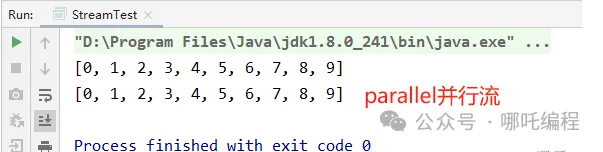
(3) Pros and cons of parallel()
① Pros:
Fully exploits the advantages of multi-core CPUs, improving program performance;
Simplifies multithreaded programming and reduces development difficulty.
② Cons:
Parallel processing may introduce problems such as thread safety, so the choice needs to be made according to the specific situation;
Parallel processing comes with extra overhead, such as creating and destroying thread pools and thread switching, so for small data volumes and simple calculations serial processing may be faster.
(4) When should you use parallel()?
In real development, you should weigh factors such as data volume, computational complexity, and hardware.
For example:
The data volume is large, say 10,000 elements;
The computational complexity is high, requiring complex calculations per element;
The hardware is beefy, e.g. a multi-core CPU.
7. Algorithm optimization
In the example above, avoiding base64 decoding should be classified as algorithm optimization.
A program is made of data structures and algorithms. A high-quality algorithm can significantly improve execution efficiency, reducing runtime and resource consumption. By contrast, an inefficient algorithm can make things run extremely slowly and consume a lot of system resources.
Many problems can be solved through algorithm optimization, for example:
1. Loops and recursion
Loops and recursion are common operations in Java programming, but overly complex business logic often brings layers of nested loops, and unnecessary repeated looping greatly reduces execution efficiency.
Recursion is a technique where a function calls itself, similar to a loop. Although recursion can solve many problems, its efficiency leaves something to be desired.
2. Memory management
Java comes with a garbage collector, so developers don’t need to free memory manually.
However, unreasonable memory usage can cause memory leaks and performance degradation. Make sure to release objects that are no longer used in time and avoid creating too many temporary objects.
3. Strings
I think strings are the most frequently used technique in Java programming — many programmers would define every variable as a string if they could.
However, because strings are immutable, every string concatenation or replacement creates a new string. This takes up a lot of memory and processing time.
Using StringBuilder for string concatenation can significantly improve performance.
4. IO operations
IO operations are usually the most performance- and resource-hungry operations. When handling large amounts of IO, be sure to optimize the IO code to improve program performance — for example, the no-disk-write image handling mentioned above completely solves the IO problem.
5. Choosing a data structure
Choosing an appropriate data structure is crucial to a program’s performance.
Take Map, the second most used thing in the Java world. The common ones are HashMap, HashTable, and ConcurrentHashMap.
HashMap, implemented on an array + linked list, can store null keys and null values, and is not thread-safe;
HashTable, implemented on an array + linked list, allows neither null keys nor null values, and is thread-safe; it achieves thread safety by locking the entire HashTable when modifying data, which is inefficient — ConcurrentHashMap made related optimizations;
ConcurrentHashMap, implemented on a segmented array + linked list, is thread-safe; by splitting the whole Map into N Segments it provides the same thread safety while improving efficiency N-fold — 16-fold by default.
Hashtable’s synchronized applies to the entire hash table, i.e. it locks the whole table each time so a thread has exclusive access. ConcurrentHashMap allows multiple modification operations to proceed concurrently, and the key to that is the lock separation technique.
Reprinted from: 哪吒编程


