
1. The truth behind a page that takes 5 seconds to load
Today while modifying the front-end pages, I found that one page in the program loads very slowly, taking about 5 seconds. That’s really hard to accept, and I don’t know why nobody has brought this up in all the time it’s been live.
I remember there’s a term for this: the instant-open rate.
The instant-open rate means being able to finish loading a page within 1 second.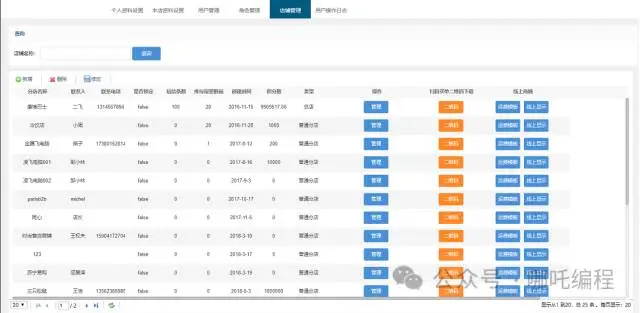
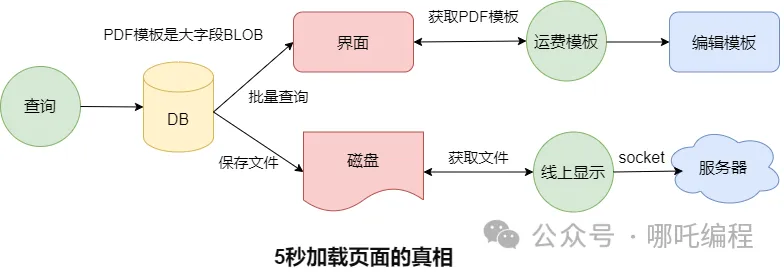
When querying, it hits the backend database and queries the first 20 rows of data. Logically that should be fast. I traced the code to see what the problem was, and in the end found there were three issues:
The table has a large BLOB field that stores a PDF template — the shipping template in the image above;
After the query, this PDF template gets stored to the local disk
Clicking to display it online reads the local PDF template and transmits it to the server over a socket.
Batch-querying a large field, writing files to disk in bulk, and reading large files and transferring them over the network — of course it’s slow. With all that absurd maneuvering, taking only 5 seconds to finish loading is already something to be thankful for.
2. Four steps of optimization
1. “Lazy loading”
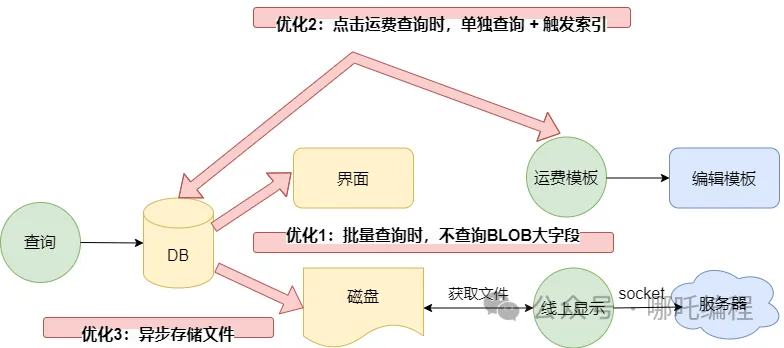
Investigation showed that this PDF template is only used when the shipping template button is clicked.
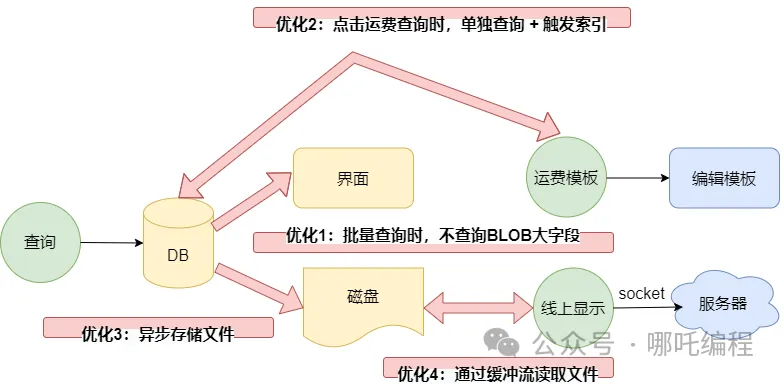
- Optimization 1: When the query button is clicked, don’t query the PDF template;
- Optimization 2: When the shipping template is clicked, query by uuid, which both hits the index and avoids sorting by time. It only queries a single row, so it’s much, much faster. I’d call this “lazy loading”.
- Optimization 3: Save the file to disk asynchronously.
2. Online display = it just reads one file, so why is it slow?
I opened the code and saw it’s actually read through FileReader. Good grief~ is there a problem with that?
It was all copied from Baidu — and Baidu can’t be wrong, right? And I tested it, no problem.
Yeah, right, no problem, it does meet the requirement. But why use this? No idea. Never mind efficiency~
Optimization 4: Read the file through a buffered stream
3. First, a god’s-eye view: what are IO streams?
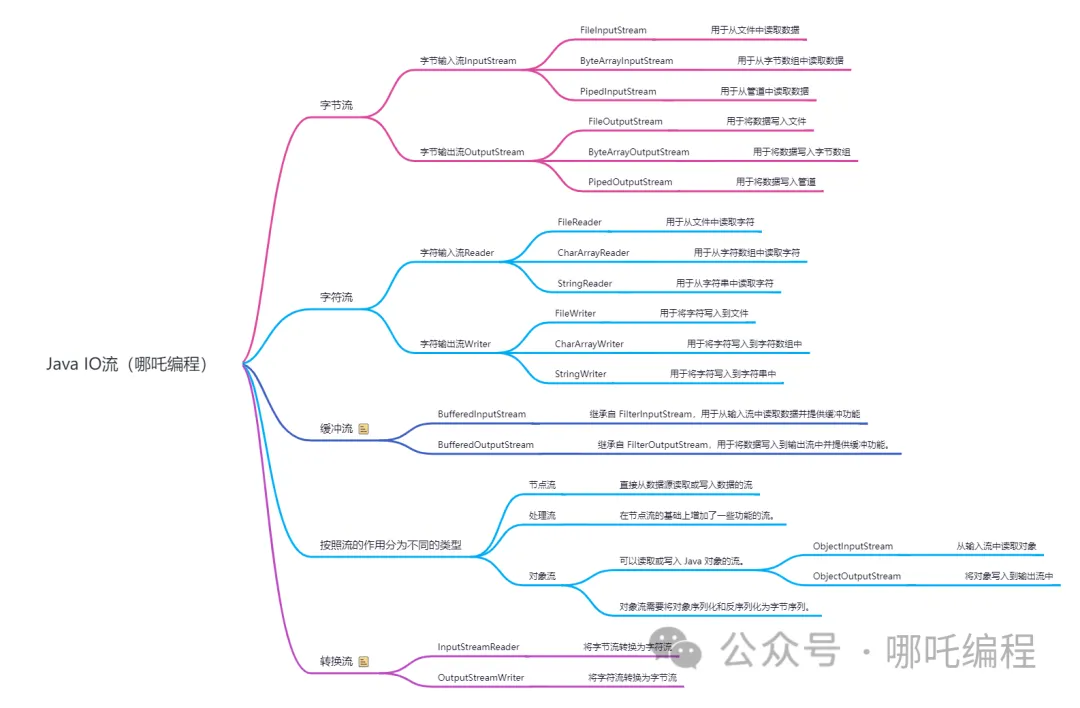
Java I/O (Input/Output) is a wrapper around traditional I/O operations; it operates on data in the form of streams.
InputStream represents an input stream; it is an abstract class and cannot be instantiated. InputStream defines some general methods such as read() and skip(), used to read data from an input stream;
OutputStream represents an output stream; it is also an abstract class and cannot be instantiated. OutputStream defines some general methods such as write() and flush(), used to write data to an output stream;
Besides byte streams, Java also provides character streams. Character streams are similar to byte streams, except that character streams read and write data by character rather than by byte. The most basic character streams in Java are Reader and Writer; they are conversion classes based on InputStream and OutputStream, used to convert between byte streams and character streams.
BufferedInputStream and BufferedOutputStream are buffered input/output streams provided in the I/O package. They can improve the efficiency of I/O operations, have a good caching mechanism, can reduce disk operations, and shorten file transfer time. When reading and writing with BufferedInputStream and BufferedOutputStream, Java automatically adjusts the buffer size so that it can adapt to different data transfer speeds.
There are streams that can read or write Java objects; typical object streams include ObjectInputStream and ObjectOutputStream, which convert Java objects into byte streams for transmission or storage;
In the previous post 《增加索引+异步+不落地后,从12h优化到15min》, four optimization approaches were mentioned: database optimization, reuse optimization, parallel optimization, and algorithm optimization.
Among them, the Buffered stream is a kind of reuse optimization, and this page’s queries can absolutely be improved through reuse optimization.
4. Let’s write an example and test it
1. Reading through the character input stream FileReader
FileReader doesn’t even have a readLine() method. I’m speechless~
1 | private static int readFileByReader(String filePath) { |
2. Reading through the buffered stream BufferedReader1
2
3
4
5
6
7
8
9
10
11
12private static String readFileByBuffer(String filePath) {
StringBuilder builder = new StringBuilder();
try (BufferedReader reader = new BufferedReader(new FileReader(filePath))) {
String data = null;
while ((data = reader.readLine())!= null){
builder.append(data);
}
}catch (Exception e) {
System.out.println("readFileByReader异常:" + e);
}
return builder+"";
}
I simulated 150,000 files in a loop for the test: FileReader took 8136 milliseconds and BufferedReader took 6718 milliseconds — about a second and a half of difference. The gap is still considerable. As the saying goes, dripping water wears through stone.
It’s the same read method, just wrapped in one extra layer. What’s the difference?
BufferedReader is a buffered character input stream that can wrap FileRead. It provides a cache array that reads data into the cache area according to certain rules. An input stream has to character-encode the data every time it reads file data, whereas the appearance of BufferedReader reduces the number of times the input stream accesses the data source: it reads a certain amount of data into the cache area at once and character-encodes it, thereby improving IO efficiency.
Without buffering, every call to read() or readLine() may cause bytes to be read from the file, converted to characters, and then returned, which can be very inefficient.
It’s like picking up packages. When you go to pick up packages, you definitely want to get them all in one trip and avoid making another trip.
FileReader is like picking them up one at a time, and never tiring of it;
BufferedReader is like taking as many of your packages as you can — though there’s a limit, for example you can only carry 5 packages at a time. That 5 is the buffer. Efficiency-wise, it improves severalfold.
Wrapping FileRead turns it into the BufferedRead buffered character input stream. In fact, Java IO streams are the most typical example of the decorator pattern. The decorator pattern adds enhanced functionality without changing the original class by replacing inheritance with composition, mainly solving the problem of overly complex inheritance relationships. I organized a post on the decorator pattern before, so I won’t discuss it here.
3. Let’s look at the source code again.
(1) FileReader.read()’s source code is very simple — it just reads directly1
2
3public int read(char cbuf[], int off, int len) throws IOException {
return in.read(cbuf, off, len);
}
(2) BufferedReader.read()’s source code is more complex. Let’s look at its core method1
2
3
4
5
6
7
8
9
10
11
12
13
14
15
16
17
18
19
20
21
22
23
24
25
26
27
28
29
30
31
32
33
34
35
36
37
38
39
40fill()private void fill() throws IOException {
int dst;
if (markedChar <= UNMARKED) {
/* No mark */
dst = 0;
} else {
/* Marked */
int delta = nextChar - markedChar;
if (delta >= readAheadLimit) {
/* Gone past read-ahead limit: Invalidate mark */
markedChar = INVALIDATED;
readAheadLimit = 0;
dst = 0;
} else {
if (readAheadLimit <= cb.length) {
/* Shuffle in the current buffer */
System.arraycopy(cb, markedChar, cb, 0, delta);
markedChar = 0;
dst = delta;
} else {
/* Reallocate buffer to accommodate read-ahead limit */
char ncb[] = new char[readAheadLimit];
System.arraycopy(cb, markedChar, ncb, 0, delta);
cb = ncb;
markedChar = 0;
dst = delta;
}
nextChar = nChars = delta;
}
}
int n;
do {
n = in.read(cb, dst, cb.length - dst);
} while (n == 0);
if (n > 0) {
nChars = dst + n;
nextChar = dst;
}
}
Core method fill():
The buffered character input stream has an underlying buffered character array of 8192 elements. When the buffer’s contents are fully read, the fill() method is used to read data from the hard disk to fill the buffer array;
The buffered character output stream has an underlying buffered character array of 8192 elements. The flush method is used to write the contents of the buffer array to the hard disk;
After using a buffer array, the program spends most of its running time on direct memory-to-memory data exchange. Direct memory operations are relatively efficient, and it reduces the number of times the CPU operates the hard disk through memory;
Closing a buffered character stream always first releases the corresponding buffer array space and then closes the corresponding character input stream and character output stream that were created.
Since buffering is so useful, why does the JDK set the buffered character array so small — only 8192 bytes? It’s a fairly compromise solution. If the buffer were too large, it would increase the time of each single read and write, and memory size is also limited — it’s impossible to let all of it do just this one thing.
Many of you have surely also used its read(char[] cbuf). It maintains a char array internally, and every time data is written/read, it operates on the array, which reduces the number of IOs.
(3) The four major attributes of buffer
mark: the mark
position: the position, the index of the next element to be read or written. This value changes every time buffer data is read or written, preparing for the next read or write
limit: represents the current end point of the buffer; you cannot read or write to positions beyond the limit. And the limit can be modified
capacity: the capacity, i.e. the maximum amount of data that can be held; it is set when the buffer is created and cannot be changed.
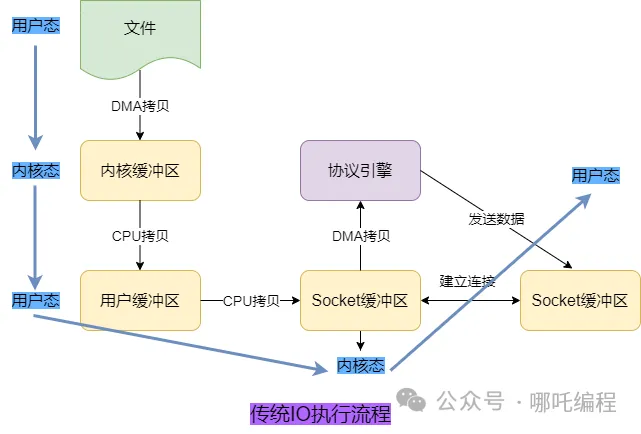
4. Buffered stream: 4 context switches + 4 copies
Traditional IO execution requires 4 context switches (user mode -> kernel mode -> user mode -> kernel mode -> user mode) and 4 copies.
The disk file is DMA-copied to the kernel buffer
The kernel buffer is CPU-copied to the user buffer
The user buffer is CPU-copied to the Socket buffer
The Socket buffer is DMA-copied to the protocol engine.
5. NIO’s FileChannel
The more commonly used class in NIO is FileChannel, mainly used to perform IO operations on local files.
1. Common FileChannel methods are
read, reads data from the channel and puts it into the buffer;
write, writes the buffer’s data into the channel;
transferFrom, copies data from the target channel into the current channel;
4, transferTo, copies data from the current channel to the target channel.
2. Notes and details about Buffer and Channel
ByteBuffer supports typed put and get; whatever data type put puts in, get should use the corresponding data type to take it out, otherwise a BufferUnderflowException may occur;
A normal Buffer can be converted into a read-only Buffer;
NIO also provides MappedByteBuffer, which allows a file to be modified directly in memory (off-heap memory), and how it is synchronized to the file is handled by NIO;
NIO also supports completing read and write operations through multiple Buffers (i.e. a Buffer array), namely Scattering and Gathering.
3. Selector
Java’s NIO uses a non-blocking IO approach. To handle multiple client connections with a single thread, you use a Selector;
A Selector can detect whether events occur on multiple registered channels. If an event occurs, it obtains the event and then handles each event accordingly. In this way, only a single thread is needed to manage multiple channels, that is, to manage multiple connections and requests.
Reading and writing are performed only when a connection/channel truly has a read or write event, which greatly reduces system overhead, and there is no need to create a thread for every connection or to maintain multiple threads.
4, It avoids the overhead caused by context switching between multiple threads.
4. Selector-related methods
open();//gets a selector object
select(long timeout);//monitors all registered channels; when one of them has an IO operation that can proceed, the corresponding SelectionKey is added to an internal set and returned. The parameter is used to set the timeout
selectedKeys();//gets all the SelectionKeys from the internal set.
6. The memory-mapping technique mmap
1. File mapping
Traditional file I/O operations can become very slow, and that is when mmap makes its shining entrance.
mmap (Memory-mapped files) is a mechanism for creating mapped files in memory; it allows us to access a file as if we were accessing memory, thereby avoiding frequent file I/O operations.
The way to use mmap is to create a virtual address in memory and then map the file onto this virtual address; this mapping process is completed by the operating system.
After the mapping is established, the process can read and write this section of memory by means of pointers, and the system will automatically write it back to the corresponding file on disk. In this way the file read operation is completed without calling system functions such as read and write.
Modifications to this region in kernel space are also directly reflected in user space, so that files can be shared between different processes.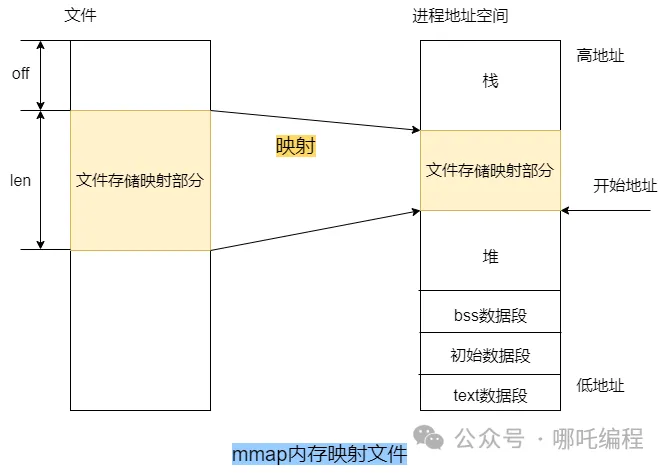
2. Using mmap in Java
In Java, mmap technology mainly uses the FileChannel class in the JavaNIO (New IO) library, which provides a way to map a file into memory called MappedByteBuffer. MappedByteBuffe is a subclass of ByteBuffer; it extends ByteBuffer’s functionality and can map a file directly into memory.
A layer of cache is created as an index based on the file address and placed in virtual memory. When used, it finds the location of the file on disk directly by address and loads the data in segments into system memory (pagecache).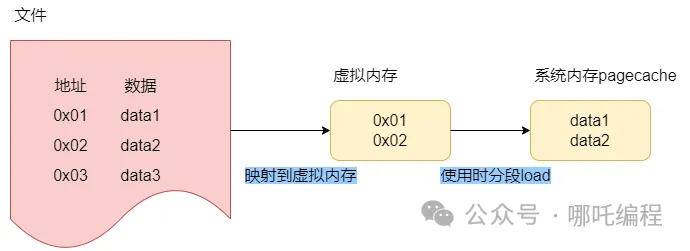
1 | public static String readFileByMmap(String filePath) { |
3. The memory-mapping technique mmap: 4 context switches + 3 copies
mmap is a memory-mapping technique. Compared with traditional buffered streams, mmap is essentially just one CPU copy less, replaced by data sharing.
Although it reduces one copy, the number of context switches remains unchanged.
Because there is one CPU copy, mmap is not zero-copy in the strict sense.
RocketMQ uses mmap to improve the read and write performance of disk files.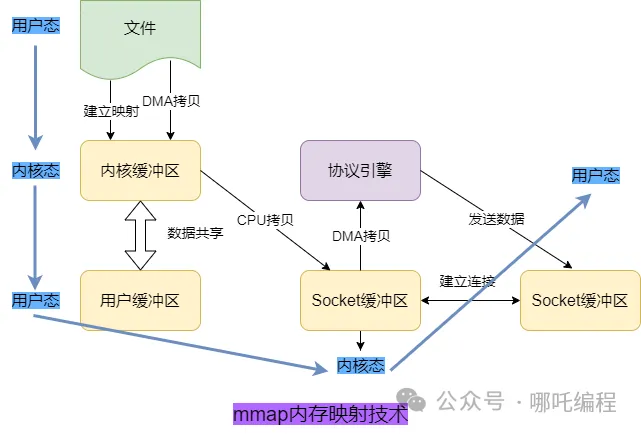
7. sendFile zero-copy
Zero-copy compresses the number of context switches and copies to the extreme.
1. Traditional IO stream
Copy the file from disk into kernel space memory;
Copy the contents of kernel space into user space memory;
User space writes the contents into kernel space memory;
The socket reads the kernel space memory and sends the contents to the third-party server.
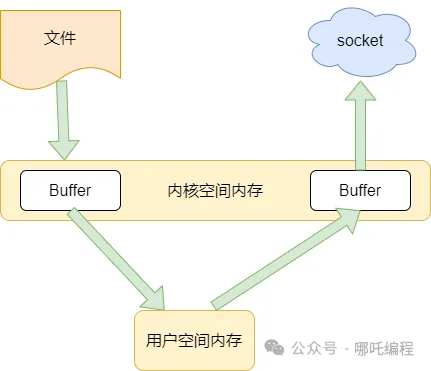
2. sendFile zero-copy
With the support of the kernel, zero-copy has one step fewer — the copy from the kernel cache to user space — which saves both memory and CPU scheduling time and makes things more efficient.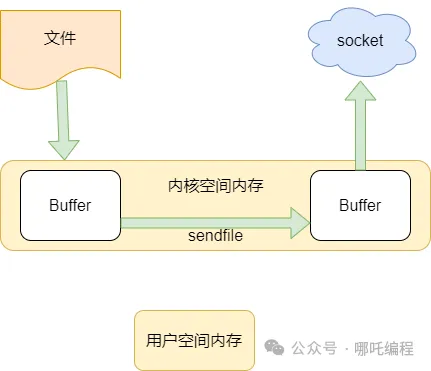
3. sendFile zero-copy: 2 context switches + 2 copies
It eliminates the user buffer directly, and there is no CPU copy, hence the name zero-copy.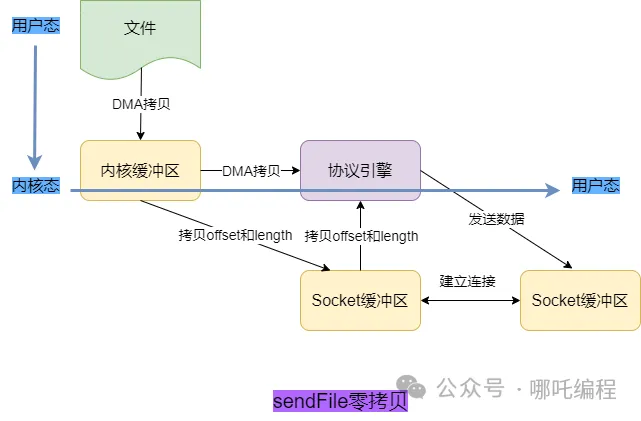
Revisiting optimization 4: reading the file through zero-copy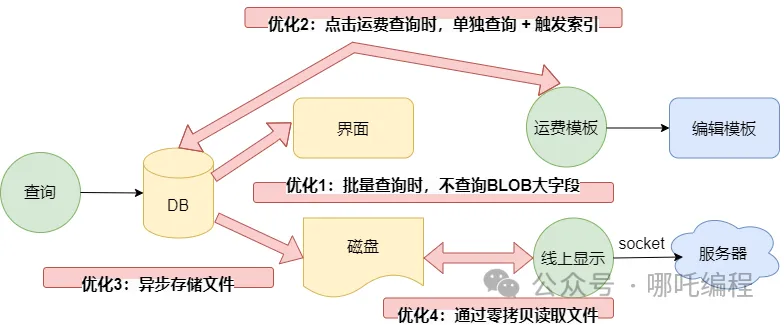
8. Summary of the process
With 4 optimizations, the page’s load time was brought under 1 second, a solid increase in the program’s instant-open rate.
When batch querying, don’t query the large BLOB field;
When the shipping cost query is clicked, query separately + trigger the index, achieving “lazy loading”;
Store files asynchronously
Read local files through buffered stream -> memory-mapping technique mmap -> sendFile zero-copy;
Through one round of page optimization, I gained a great deal:
Through business optimization, “lazy-loaded” the large BLOB field;
Store files asynchronously;
Systematically learned Java IO streams: input/output streams, character streams, character streams, conversion streams;
Reading files through NIO’s FileChannel gives a significant performance improvement over buffered streams;
Compared with traditional buffered streams, the memory-mapping technique mmap is essentially just one CPU copy from the kernel buffer to the user buffer less, turning it into data sharing;
sendFile zero-copy discards user space memory and discards the CPU copy — a perfect zero-copy solution.
Through code examples, I compared horizontally the performance gaps between FileReader, BufferedReader, NIO’s FileChannel, the memory-mapping technique mmap, and sendFile zero-copy;
Reposted from: 哪吒编程


