
1. Understand MySQL’s Execution Process First
Only once we understand MySQL’s execution process do we know how to optimize SQL.
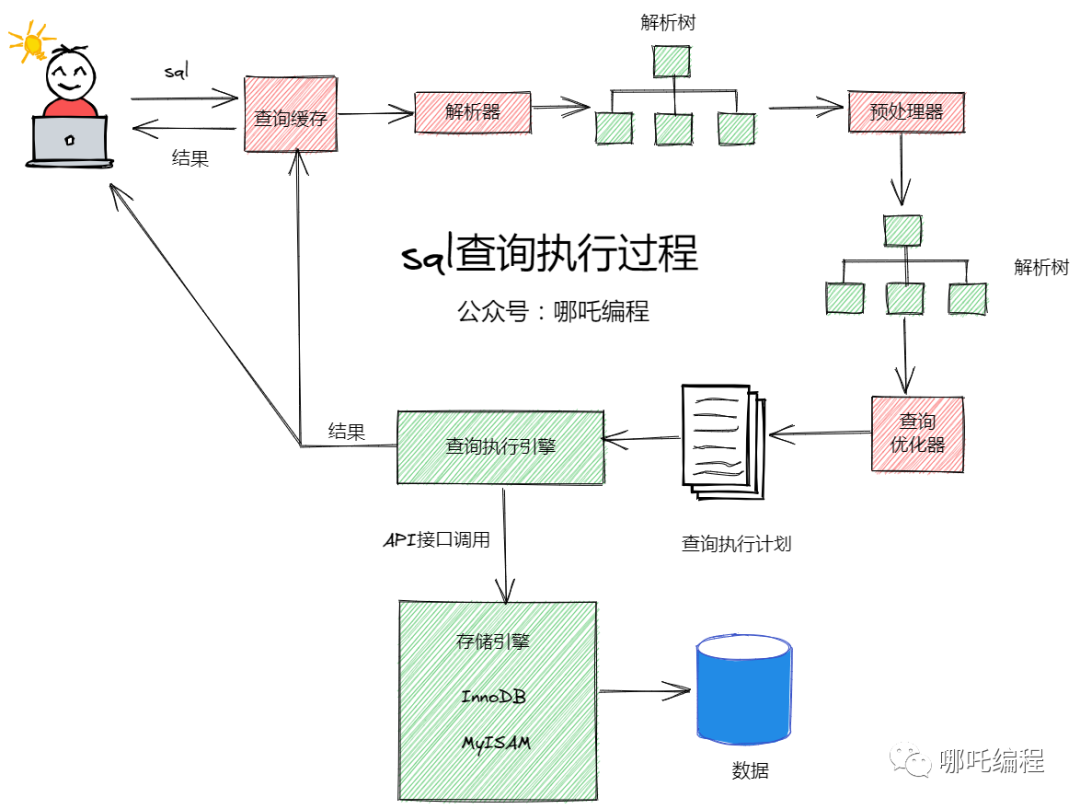
The client sends a query statement to the server;
The server checks the query cache first; if the cache is hit, the data stored in the cache is returned immediately;
If the cache is not hit, MySQL parses the SQL statement by keyword and generates a corresponding parse tree; the MySQL parser validates and parses it using MySQL syntax. For example, it verifies whether a wrong keyword was used, or whether keywords are used correctly;
Preprocessing checks whether the parse tree is reasonable according to certain MySQL rules, such as checking whether tables and columns exist; it also resolves names and aliases, and then the preprocessor verifies permissions;
Based on the execution plan, it queries the execution engine, which calls the API to call the storage engine to query the data;
The result is returned to the client and cached;
2. Common Database Conventions
All database object names must use lowercase letters and be separated by underscores;
All database object names are forbidden from using MySQL reserved keywords;
Database object names should be self-explanatory, and should not exceed 32 characters;
Temporary tables must be prefixed with tmp and suffixed with the date; backup tables must be prefixed with bak and suffixed with the date (timestamp);
The column names and column types storing the same data must be consistent across all tables;
3. All Tables Must Use the InnoDB Storage Engine
Unless there are special requirements (that is, functionality InnoDB cannot satisfy, such as column storage or spatial data storage), all tables must use the InnoDB storage engine (MySQL before 5.5 used MyISAM by default, and from 5.6 onward the default is InnoDB).
InnoDB supports transactions and row-level locking, offers better recoverability, and performs better under high concurrency.
4. Every InnoDB Table Must Have a Primary Key
InnoDB is an index-organized table: the logical order in which data is stored is the same as the order of the index. Each table can have multiple indexes, but the table’s storage order can only be one.
InnoDB organizes tables according to the order of the primary key index.
Do not use frequently updated columns as the primary key, and do not use multi-column primary keys;
Do not use UUID, MD5, HASH, or string columns as the primary key (they cannot guarantee that data grows in order);
It is recommended to use an auto-increment ID as the primary key;
5. Use UTF8 Uniformly as the Character Set for Databases and Tables
Compatibility is better, and a uniform character set avoids garbled text caused by character set conversion. Comparing different character sets requires conversion first, which invalidates indexes. If the database needs to store emoji, the character set must be utf8mb4.
6. For Query SQL, Try Not to Use select * — Use Specific Fields Instead
The drawbacks of select *:
It adds a lot of unnecessary overhead, such as CPU, IO, memory, and network bandwidth;
It reduces the possibility of using a covering index;
It increases the possibility of having to look up rows in the table again;
When the table structure changes, the front end has to change as well;
Query efficiency is low;
7. Avoid Using or to Join Conditions in the where Clause
Using or may invalidate the index, resulting in a full table scan;
For the case of or without an index on salary, suppose it uses the id index, but when it reaches the salary condition it still has to do a full table scan;
In other words, the whole process takes three steps: full table scan + index scan + merge. If it did a full table scan from the start, a single scan would settle it;
Although MySQL has an optimizer, when it encounters an or condition, the index may still be abandoned out of consideration for efficiency and cost;
8. Prefer Numeric Types Over String Types
Because the engine compares each character of a string one by one when processing queries and joins;
Whereas for a numeric type, only one comparison is needed;
Characters reduce the performance of queries and joins and increase storage overhead;
9. Use varchar Instead of char
A variable-length varchar field stores data according to the actual length of the content, so it takes up less space and saves storage;
char stores according to the declared size, padding with spaces when the content is shorter;
Also, for queries, searching within a relatively small field is more efficient;
10. Financial and Banking Amount Fields Must Use the decimal Type
Inexact floating point: float, double
Exact floating point: decimal
The Decimal type is an exact floating point type and does not lose precision during calculation;
The space it occupies is determined by the defined width; every 4 bytes can store 9 digits, and the decimal point takes up one byte;
It can be used to store integer data larger than bigint;
11. Avoid Using the ENUM Type
Modifying ENUM values requires an ALTER statement;
ORDER BY operations on the ENUM type are inefficient and require extra work;
Do not use numbers as ENUM values;
12. For distinct De-duplication, Filter Fewer Fields
A statement with distinct consumes more CPU time than one without it;
When many fields are queried, if distinct is used, the database engine compares the data and filters out duplicates;
However, this comparison and filtering process consumes system resources such as CPU time;
13. Use Default Values Instead of null in where
It is not that using is null or is not null necessarily skips the index; this depends on the MySQL version and the query cost;
If the MySQL optimizer finds that using the index costs more than not using it, it will abandon the index. Conditions such as !=, <>, is null, and is not null are often thought to invalidate indexes;
In fact, it is usually because the query cost is high in general, so the optimizer automatically abandons the index;
If you replace null values with default values, using the index often becomes possible, and the meaning expressed is relatively clearer as well;
14. Avoid Using the != or <> Operators in the where Clause
Using != and <> is very likely to invalidate the index;
You should try to avoid using the != or <> operators in the where clause, otherwise the engine will abandon the index and perform a full table scan;
Business needs come first; if there is really no other way, you just have to use them. It is not that they cannot be used;
15. Among inner join, left join, and right join, Prefer inner join
If the three kinds of joins return the same result, prefer inner join; if you use left join, try to keep the left table as small as possible.
inner join is an inner join and only keeps the fully matching result set from the two tables;
left join returns all rows of the left table, even if there is no matching record in the right table;
right join returns all rows of the right table, even if there is no matching record in the left table;
Why?
If inner join is an equi-join, it returns fewer rows, so performance is relatively better;
If a left join is used, try to keep the data on the left side as small as possible and put the conditions on the left side, which means fewer rows may be returned;
This is a MySQL optimization principle: a small table drives a large table, and a small data set drives a large data set, so that performance is better;
16. Improve the Efficiency of group by Statements
- Counter-example
Group first, then filter1
select job, avg(salary) from employee group by jobhaving job ='develop' or job = 'test';
- Good example
Filter first, then group1
select job,avg(salary) from employee where job ='develop' or job = 'test' group by job;
- Reason
You can filter out the records you don’t need before the statement is executed
17. Prefer truncate When Emptying a Table
truncate table is functionally the same as a delete statement without a where clause: both delete all rows in the table. But truncate table is faster than delete and uses fewer system and transaction log resources.
The delete statement deletes one row at a time and records an entry in the transaction log for each deleted row. truncate table deletes data by releasing the data pages used to store the table data, and only records the release of pages in the transaction log.
truncate table deletes all rows in a table, but the table structure and its columns, constraints, indexes, and so on remain unchanged. The counter value used for the new row identifier is reset to the seed of that column. If you want to keep the identity counter value, use DELETE instead. If you want to delete the table definition and its data, use the drop table statement.
For tables referenced by a foreign key constraint, you cannot use truncate table; instead use a DELETE statement without a where clause. Because truncate table is not logged, it cannot fire triggers.
truncate table cannot be used on tables that participate in an indexed view.
18. When Running delete or update Statements, Add a limit or Delete in Batches in a Loop
(1) It lowers the cost of writing the wrong SQL
Emptying a table is no small matter — one slip of the hand and it is all gone, delete the database and run away? If you add a limit, even if you delete the wrong thing you only lose part of the data, and it can be recovered quickly from the binlog.
(2) SQL efficiency is likely to be higher
If you add limit 1 to the SQL, and the first row hits the target, it returns; without the limit, it would keep scanning the table.
(3) It avoids long transactions
When delete is executed, if age has an index, MySQL will add write locks and gap locks to all related rows, and all rows involved in the execution will be locked. If the number of deleted rows is large, it will directly affect and make the related business unusable.
(4) With a large amount of data, it is easy to max out the CPU
If you delete a very large amount of data without a limit to constrain the number of records, it is easy to max out the CPU, making deletion slower and slower.
(5) Table locking
Deleting too much data at once may cause table locking and produce a lock wait timeout exceed error, so it is recommended to operate in batches.
19. The UNION Operator
After joining tables, UNION filters out duplicate records, so after the table join it sorts the resulting result set, removes duplicate records, and then returns the result. In most real applications there are no duplicate records; the most common case is a UNION of a process table and a history table. For example:1
select username,tel from userunionselect departmentname from department
When this SQL runs, it first fetches the results of the two tables, then uses sorting space to sort and remove duplicate records, and finally returns the result set. If the tables hold a large amount of data, it may end up sorting on disk. Recommended approach: use the UNION ALL operator instead of UNION, because UNION ALL simply merges the two results and returns them.
20. The IN Clause in a SQL Statement Should Not Contain Too Many Fields
MySQL stores all the constants in an IN clause in a single array, and that array is sorted. If there are too many values, the overhead is relatively large. If they are consecutive numbers, you can use between instead, or replace it with a join query.
21. Performance Gains from Batch Inserts
(1) Multiple submissions
1 | INSERT INTO user (id,username) VALUES(1,'哪吒编程');INSERT INTO user (id,username) VALUES(2,'妲己'); |
(2) Batch submission1
INSERT INTO user (id,username) VALUES(1,'哪吒编程'),(2,'妲己');
By default, an insert SQL statement is wrapped in transaction control, so every statement needs a transaction start and a transaction commit, whereas batch processing starts and commits the transaction once. The efficiency gain is obvious, and beyond a certain volume the effect is significant — you just don’t notice it in everyday use.
22. Don’t Use Too Many Table Joins or Too Many Indexes — Generally Within 5
(1) Don’t use too many table joins — generally within 5
The more tables that are joined, the greater the compilation time and overhead
Every join generates a temporary table in memory
You should split the joined tables into several smaller executions; readability is also better
If you really need to join many tables to get the data, that means the design is bad
In Alibaba’s conventions, multi-table queries of fewer than three tables are recommended
(2) Don’t use too many indexes — generally within 5
Indexes are not the more the better: although they improve query efficiency, they reduce insert and update efficiency;
An index can be understood as a table itself; it can store data, and its data takes up space;
The data in an index table is sorted, and sorting also takes time;
During insert or update, the index may be rebuilt; if the amount of data is huge, the rebuild will re-sort the records, so creating an index requires careful consideration and depends on the specific situation;
The number of indexes on a table should preferably not exceed 5; if there are too many, you need to consider whether some of them are necessary;
23. Don’t Create a Separate Index for Every Column in a Table
People really do this, and it leaves me speechless.
2万字带你精通MySQL索引 (A 20,000-word guide to mastering MySQL indexes)
24. How to Choose the Order of Index Columns
The purpose of creating an index is to look up data through the index, reduce random IO, and increase query performance. The fewer rows the index can filter out, the less data has to be read from disk.
Put the column with the highest cardinality on the leftmost side of a composite index (cardinality = number of distinct values in the column / total number of rows in the column).
Try to put columns with a small field length on the leftmost side of a composite index (because the smaller the field length, the more data can be stored in one page, and the better the IO performance).
Put the most frequently used columns on the left side of a composite index (this way you can create fewer indexes).
25. For Frequent Queries, Prefer a Covering Index
Covering index: an index that contains all the fields involved in a query (the fields included in where, select, order by, and group by).
Benefits of a covering index:
(1) It avoids the secondary lookup of the index in InnoDB tables
InnoDB stores data in the order of the clustered index. For InnoDB, what is stored in the leaf nodes of a secondary index is the primary key information of the row. If you query data using a secondary index, after finding the corresponding key value you still have to do a secondary lookup through the primary key to get the data you actually need.
With a covering index, all the data can be obtained from the key values of the secondary index, avoiding the secondary lookup of the primary key, reducing IO operations, and improving query efficiency.
(2) It can turn random IO into sequential IO to speed up queries
Because a covering index is stored in the order of key values, for IO-intensive range lookups there is far less IO than reading each row of data randomly from disk. Therefore, when accessing data through a covering index, the random read IO from disk can also be turned into the sequential IO of an index lookup.
26. It Is Recommended to Use Prepared Statements for Database Operations
Prepared statements can reuse these plans, reducing the time required to compile SQL, and can also solve the SQL injection problems caused by dynamic SQL.
Passing only parameters is more efficient than passing SQL statements.
The same statement can be parsed once and used many times, improving processing efficiency.
27. Avoid Large Transactions
Modifying data in large batches is certainly done within a single transaction, which locks a large amount of data in the table, causing a great deal of blocking, and blocking has a very large impact on MySQL performance.
In particular, long blocking will use up all available database connections, which makes other applications in the production environment unable to connect to the database. So you must be careful to perform large batch write operations in batches.
28. Avoid Using Built-in Functions on Indexed Columns
Using a built-in function on an indexed column invalidates the index.
29. Composite Index
When sorting, sort according to the order of the columns in the composite index, even if only one column in the index is being sorted; otherwise sorting performance will be relatively poor.1
create index IDX_USERNAME_TEL on user(deptid,position,createtime);select username,tel from user where deptid= 1 and position = 'java开发' order by deptid,position,createtime desc;
In fact, this only queries the records matching deptid= 1 and position = ‘java开发’ and sorts them by createtime in descending order, but writing order by createtime desc performs relatively poorly.
30. The Leftmost Property of a Composite Index
(1) Create a composite index1
ALTER TABLE employee ADD INDEX idx_name_salary (name,salary)
(2) Satisfy the leftmost property of the composite index, even if only partially — the composite index takes effect1
SELECT * FROM employee WHERE NAME='哪吒编程'
(3) If the leftmost field does not appear, the leftmost property is not satisfied and the index is invalidated1
SELECT * FROM employee WHERE salary=5000
(4) If the whole composite index is used, appearing in left-side order name,salary, the index takes effect1
SELECT * FROM employee WHERE NAME='哪吒编程' AND salary=5000
(5) Although it violates the leftmost property, MySQL optimizes when executing the SQL and swaps the order internally1
SELECT * FROM employee WHERE salary=5000 AND NAME='哪吒编程'
(6) Reason
A composite index is also called a joint index. When we create a joint index, such as (k1,k2,k3), it is equivalent to creating three indexes: (k1), (k1,k2), and (k1,k2,k3). This is the leftmost matching principle.
If a joint index does not satisfy the leftmost principle, the index will generally be invalidated.
31. Use force index When Necessary to Force a Query to Use a Certain Index
Sometimes the MySQL optimizer picks the index it considers appropriate to retrieve the SQL statement, but the index it uses may not be the one we want. At this point you can use force index to force the optimizer to use the index we specify.
32. Optimize like Statements
Fuzzy queries: the thing programmers love most is using like, but like can very easily invalidate your index.
First, try to avoid fuzzy queries. If you must use them, don’t use a full fuzzy query; try to use a right-hand fuzzy query, i.e. like ‘…%’, which will use the index;
A left-hand fuzzy like ‘%…’ cannot use the index directly, but you can use the reverse + function index form to turn it into like ‘…%’;
A full fuzzy query cannot be optimized. If you really must use one, it is recommended to use a search engine.
33. Keep SQL Statement Formatting Consistent
For the following two SQL statements, programmers consider them identical, while the database query optimizer considers them different.1
select * from user;select * From USER;
Both are very common ways of writing, and few people pay attention to it — it is just that the table name differs in case. However, the query parser considers these two different SQL statements, parses them twice, and generates two different execution plans. As a rigorous Java development engineer, you should ensure that two identical SQL statements look the same no matter where they appear.
34. Don’t Write SQL Statements That Are Too Complex
You often hear someone bragging: “I wrote an 800-line SQL statement, the logic is super strong, we even held a meeting to walk through the SQL, and everyone looked at me with admiration…”
Generally speaking, nested subqueries or a three-table join query are fairly common, but if there are more than 3 levels of nesting, the query optimizer can easily produce a wrong execution plan, affecting SQL efficiency. SQL execution plans can be reused; the simpler the SQL, the greater the chance it will be reused, and generating an execution plan is also very time-consuming.
35. Turn Large DELETE, UPDATE, and INSERT Queries into Several Small Queries
Does writing a SQL statement of dozens or hundreds of lines make you look impressive? However, to achieve better performance and better data control, you can turn them into several small queries.
36. About Temporary Tables
Avoid frequently creating and dropping temporary tables, to reduce the consumption of system table resources;
When creating a temporary table, if you insert a very large amount of data at once, you can use select into instead of create table to avoid generating a large amount of log;
If the amount of data is not large, to ease the pressure on system table resources, you should create table first and then insert;
If temporary tables are used, always explicitly drop all temporary tables at the end of the stored procedure. truncate table first, then drop table, which avoids locking system tables for a long time.
37. Use explain to Analyze Your SQL Execution Plan
(1) type
system: the table has only one row, basically never used;
const: the table has at most one matching row of data; triggered mostly for primary key queries;
eq_ref: for each row combination from the preceding tables, one row is read from this table. This is possibly the best join type, apart from const;
ref: for each row combination from the preceding tables, all rows with matching index values are read from this table;
range: only rows in a given range are retrieved, using an index to select the rows. range can be used when using the =, <>, >, >=, <, <=, IS NULL, <=>, BETWEEN, or IN operators to compare a key column with a constant;
index: this join type is the same as ALL, except that only the index tree is scanned. This is usually faster than ALL, because index files are usually smaller than data files;
all: full table scan;
Performance ranking: system > const > eq_ref > ref > range > index > all.
In actual SQL optimization, you ultimately want to reach the ref or range level.
(2) Common Extra keywords
Using index: the information is obtained only from the index tree, with no need to look up rows in the table;
Using where: the WHERE clause is used to restrict which rows match the next table or are sent to the client. Unless you specifically request or check all rows from the table, if the Extra value is not Using where and the table join type is ALL or index, the query may have some problems. It requires looking up rows in the table.
Using temporary: MySQL often creates a temporary table to hold the result, typically when the query contains GROUP BY and ORDER BY clauses that can list columns in different ways;
38. Read/Write Splitting and Sharding
Once the amount of data reaches a certain volume, what limits the database’s storage performance can no longer be solved by optimization at the database level. At that point, read/write splitting and sharding are usually adopted, and caching is used alongside them, while database-level optimization is only the foundation.
Read/write splitting is suitable for smaller amounts of data; table sharding is suitable for medium amounts of data; and database sharding and table sharding are generally used together, which is suitable for storing large amounts of data. This is also one of the ways large internet companies today solve data storage.
39. Use a Reasonable Pagination Approach to Improve Pagination Efficiency1
select id,name from user limit 100000, 20
When paginating with the SQL statement above, as the amount of data in the table grows, using the limit statement directly becomes slower and slower.
In this case, you can take the maximum ID of the previous page, use it as the starting point, and then run the limit operation; the efficiency gain is significant.1
select id,name from user where id> 100000 limit 20
40. Try to Keep the Amount of Data in a Single Table Under Control — 5 Million Rows or Fewer Is Recommended.
5 million is not a MySQL database limit; going beyond it causes big problems with altering the table structure, backup, and recovery.
You can control the amount of data with approaches such as archiving historical data (applied to log data) and sharding (applied to business data).
41. Use MySQL Partitioning with Caution
A partitioned table appears as multiple files physically, and as one table logically;
Choose the partition key carefully; cross-partition queries may be less efficient;
It is recommended to manage large data using physical table sharding.
42. Separate Hot and Cold Data as Much as Possible and Reduce Table Width
MySQL limits each table to at most 4096 columns, and the size of each row of data cannot exceed 65535 bytes.
Reduce disk IO and ensure the memory cache hit rate for hot data (the wider the table, the more memory it takes up when loaded into the memory buffer pool, and the more IO it consumes);
Use the cache more effectively and avoid reading useless cold data;
Put columns that are often used together in one table (avoiding more join operations).
43. Don’t Create Reserved Fields in Tables
Reserved fields are hard to name in a self-explanatory way;
You cannot confirm what type of data a reserved field will store, so you cannot choose a suitable type;
Modifying the type of a reserved field locks the table;
44. Don’t Store Large Binary Data Such as Images and Files in the Database
Such files are usually large and cause the amount of data to grow rapidly in a short time. When the database reads them, it usually performs a large number of random IO operations, and when the files are large the IO operations are very time-consuming.
They are usually stored on a file server, and the database only stores the file address information.
45. It Is Recommended to Split BLOB or TEXT Columns into a Separate Extension Table
MySQL’s in-memory temporary tables do not support large data types like TEXT and BLOB. If a query contains such data, operations such as sorting cannot use in-memory temporary tables and must use disk temporary tables instead. Moreover, for this kind of data MySQL still has to perform a secondary lookup, which makes SQL performance very poor. That said, it does not mean you absolutely cannot use these data types.
If you must use them, it is recommended to split the BLOB or TEXT columns into a separate extension table. When querying, never use select *, only fetch the necessary columns, and do not query that column when you do not need the TEXT column data.
46. TEXT or BLOB Types Can Only Use Prefix Indexes
Because MySQL limits the length of index fields, the TEXT type can only use a prefix index, and TEXT columns cannot have default values.
47. Some Other Optimization Approaches
(1) When you only need one row of data, use limit 1:
limit 1 can avoid a full table scan; once the corresponding result is found, it will not keep scanning.
(2) If the sort field does not use an index, sort as little as possible
(3) All tables and fields need comments: use the comment clause to add remarks for tables and columns, and maintain the data dictionary from the very beginning.
(4) SQL formatting: keep keyword capitalization consistent and use indentation.
(5) Back up important data before modifying or deleting it.
(6) Using exists instead of in is often a good choice
(7) For the fields after where, pay attention to implicit conversion of their data types.
(8) Try to define all columns as NOT NULL:
NOT NULL columns save more space; a NULL column needs an extra byte as a flag for whether it is NULL. NULL columns require attention to null pointer issues, and when NULL columns are calculated and compared, you need to watch out for null pointer problems.
(9) Soft delete design
(10) Indexes are not suitable for fields with a large amount of duplicate data, such as gender; sort fields should have indexes created
(11) Try to avoid using cursors:
Because cursors are relatively inefficient, if a cursor operates on more than 10,000 rows, you should consider rewriting it.
Reprinted from: 哪吒编程


